


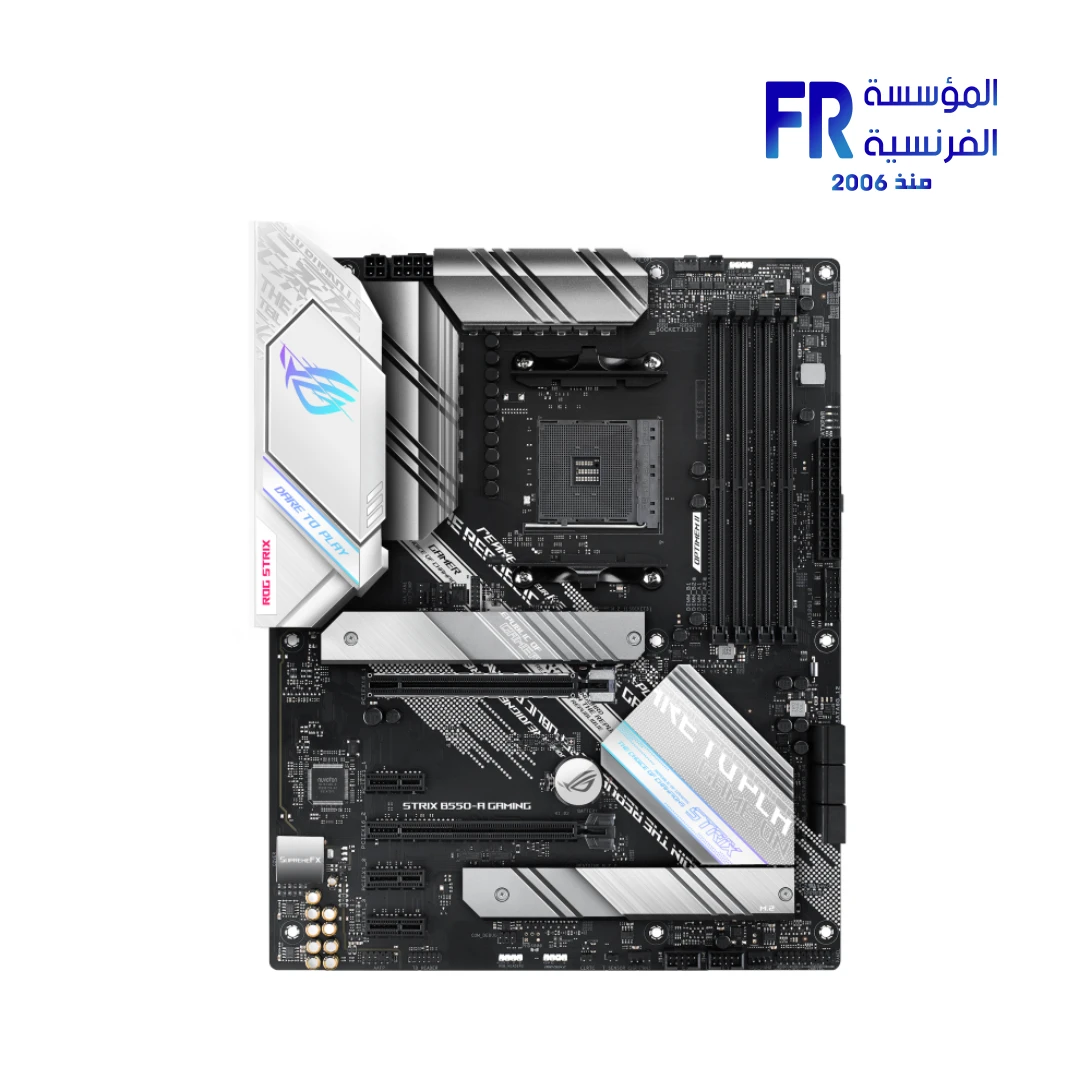


ASUS ROG Strix B550-A Gaming Socket AM4 DDR4 ATX Motherboard
8426 جنيه
- • رقم القطعة: 90MB15J0-M0EAY0
- • Form Factor & Design: ATX Form Factor (30.5 x 24.4 cm) | ROG Strix Aesthetic | Aluminum M.2 Heatsinks | Pre-mounted I/O Shield | SafeSlot | Aura Sync RGB & Addressable Gen 2 Headers
- • Compatibility: AMD AM4 Socket | Ryzen 5000 / 4000 G-Series / 3000 Series Processors | Up to 128GB DDR4 (4600MHz OC) | 2x M.2 Slots (PCIe 4.0/3.0) & 6x SATA 6Gb/s | AMD 2-Way CrossFireX
- • Performance: AMD B550 Chipset | PCIe 4.0 x16 Support (Ryzen 5000/3000) | Intel I225-V 2.5Gb Ethernet | ROG SupremeFX S1220A 8-Channel HD Audio | USB 3.2 Gen 2 (Type-A & Type-C) | BIOS FlashBack & AI Noise Cancelling Mic
- • الضمان: 3 Years
غير متوفر حالياً
هل تريد أن يتم إخطارك عندما يتوافر هذا المنتج في المخزون مجددًا؟
المنتج ده خلص حالياً. فريق المبيعات هيرشحلك بديل متوفر بنفس المستوى وبأفضل سعر.
اسأل على البديل واتساب✅ Authorized ASUS Partner in Egypt | Official 3-Year Warranty | Expert PC Building Consultation Available
ASUS ROG Strix B550-A Gaming Socket AM4 DDR4 ATX Motherboard
ASUS ROG Strix B550-A Gaming is an ATX motherboard built on the AMD B550 chipset with an AM4 socket. It supports AMD Ryzen 5000 Series, 4000 G-Series, and 3000 Series processors, has four DDR4 DIMM slots with up to 128GB capacity, and offers PCIe 4.0 x16 for Ryzen 5000/3000 chips. Available at Alfrensia for 8,099 EGP.
⚡ Engineering Highlights at a Glance:
- AMD AM4 Socket: Works with Ryzen 5000 Series, 4000 G-Series, and 3000 Series desktop processors.
- PCIe 4.0 x16: The main graphics slot runs PCIe 4.0 on Ryzen 5000/3000 chips, doubling bandwidth over PCIe 3.0.
- 4 x DDR4 DIMM Slots: Supports up to 128GB dual-channel memory with OptiMem II trace routing up to 4600 MHz (OC).
- Dual M.2 with Heatsink: One PCIe 4.0 x4 M.2 slot and one PCIe 3.0 x4 M.2 slot, with an aluminum heatsink on M.2_1.
- Intel 2.5Gb Ethernet: I225-V controller with ASUS LANGuard for faster wired networking.
- ROG SupremeFX S1220A Audio: Dual OP amplifiers, gold-plated jacks, and 120 dB SNR stereo playback.
- Aura Sync and BIOS FlashBack: Two Aura RGB headers, one addressable Gen 2 header, and BIOS FlashBack button for updates without a CPU.
Who is the ROG Strix B550-A Gaming For?
Expert Advice & Build Considerations
CPU Compatibility and PCIe Generation
The B550 chipset supports AMD Ryzen 3000, 4000 G-Series, and 5000 Series processors on the AM4 socket; Ryzen 1000 and 2000 Series are not compatible. PCIe 4.0 x16 on the main slot and PCIe 4.0 x4 on the M.2_1 slot only work with Ryzen 5000/3000 (non-G) processors. With Ryzen 4000 G-Series APUs, the main PCIe slot and M.2_1 run at PCIe 3.0 speeds instead. Verify your CPU choice against the ASUS CPU support list before purchase.
Memory and M.2 Population
Install memory in slots A2 and B2 first for dual-channel operation. The board supports up to 128GB across four DIMM slots, with OptiMem II trace routing for better signal integrity at high frequencies. The M.2_1 slot (PCIe 4.0 x4 with heatsink) sits under the chipset heatsink near the CPU; the M.2_2 slot (PCIe 3.0 x4) sits lower. On Ryzen 4000 G-Series chips, both M.2 slots run at PCIe 3.0. Note that the M.2_2 slot and SATA ports 5 and 6 share bandwidth; check the manual before populating all storage at once.
Power, USB, and Clearance
The board uses a 24-pin EATX main connector plus an 8-pin and a 4-pin ATX 12V CPU connector; connect both CPU power cables for stable power delivery on high-core-count Ryzen chips. The rear I/O provides two USB 3.2 Gen 2 ports (one Type-A and one Type-C), four USB 3.2 Gen 1, and two USB 2.0. Internal headers add two USB 3.2 Gen 1 and four USB 2.0 ports. The ATX form factor measures 30.5 x 24.4 cm and fits standard ATX mid-tower cases; check CPU cooler height and top radiator clearance if you use a large air cooler or 280mm AIO. BIOS FlashBack on the rear I/O lets you update the BIOS without a CPU installed, which helps if the board ships with a BIOS older than your Ryzen 5000 chip.
المواصفات الفنية
| Model Name | ROG STRIX B550-A GAMING |
| العلامات التجارية | ASUS |
| SKU / MPN | 90MB15J0-M0EAY0 |
| EAN / UPC | 192876826591 |
| Socket | AMD AM4 |
| Chipset | AMD B550 |
| Form Factor | ATX (30.5 x 24.4 cm) |
| CPU Support | AMD Ryzen 5000 Series / 4000 G-Series / 3000 Series |
| Memory | 4 x DDR4 DIMM, Max 128GB, Dual Channel, up to 4600 MHz (OC) on Ryzen 5000/3000 |
| Graphics Outputs | 1 x HDMI 2.1 (4K@60Hz) | 1 x DisplayPort 1.2 |
| Expansion Slots | 1 x PCIe 4.0 x16 (Ryzen 5000/3000) | 1 x PCIe 3.0 x16 (x4 mode) | 3 x PCIe 3.0 x1 |
| Multi-GPU Support | AMD 2-Way CrossFireX |
| وحدات التخزين | 1 x M.2 (PCIe 4.0 x4, 2242-22110) | 1 x M.2 (PCIe 3.0 x4, 2242-22110) | 6 x SATA 6Gb/s | RAID 0, 1, 10 |
| Ethernet | Intel I225-V 2.5Gb Ethernet with ASUS LANGuard |
| USB Ports (Rear) | 2 x USB 3.2 Gen 2 (1 x Type-A, 1 x Type-C) | 4 x USB 3.2 Gen 1 Type-A | 2 x USB 2.0 |
| USB Headers (Internal) | 1 x USB 3.2 Gen 1 (2 ports) | 2 x USB 2.0 (4 ports) |
| Audio | ROG SupremeFX S1220A 8-Channel HD Audio, 120 dB SNR playback, 113 dB SNR input |
| RGB Headers | 2 x Aura RGB | 1 x Addressable Gen 2 |
| Fan Headers | 1 x CPU Fan | 1 x CPU OPT | 3 x Chassis Fan | 1 x AIO_PUMP |
| Special Features | BIOS FlashBack | Q-LED | Q-DIMM | Q-Slot | SafeSlot | ProCool | Pre-mounted I/O shield | Aluminum M.2 heatsink |
| Included Accessories | 4 x SATA cables | ROG Strix stickers | Cable ties | Addressable LED extension cable | M.2 screw package | M.2 rubber package | Supporting DVD | User manual | ROG Thank You card |
| الضمان | 3 Years Local Alfrensia Warranty |
Expert Recommendation: Building with the ROG Strix B550-A Gaming
Pair this board with a Ryzen 5 5600, Ryzen 7 5700X, or Ryzen 7 5800X3D for the best balance of PCIe 4.0 support and gaming performance. Because PCIe 4.0 only works on Ryzen 5000/3000 (non-G) chips, choose a non-APU processor if you plan to use a PCIe 4.0 NVMe SSD.
Install memory in slots A2 and B2 first for dual-channel operation. For a 3600 MHz kit, enable DOCP in the BIOS to run the rated speed; without DOCP, memory defaults to 2133 MHz. Because M.2_2 and SATA ports 5 and 6 share bandwidth, plan your storage layout before you install drives.
Before you install the CPU, check the BIOS revision. If the board ships with a BIOS older than your Ryzen 5000 chip, use the BIOS FlashBack button on the rear I/O to update without a CPU installed. Also, connect both the 8-pin and 4-pin CPU power cables for stable power delivery on high-core-count Ryzen chips.
Use the AIO_PUMP header for liquid cooler pumps, and the CPU_FAN and CPU_OPT headers for a dual-fan tower cooler or AIO radiator fans. Enable Aura Sync in Armoury Crate to sync the two RGB headers and one addressable Gen 2 header with your other ASUS peripherals. Because the board has a pre-mounted I/O shield and Q-LED indicators, the build process is simpler for first-timers; if POST fails, check the Q-LED color to identify whether the issue is CPU, DRAM, VGA, or boot device.
Frequently Asked Questions
Which AMD processors are compatible with the ROG Strix B550-A Gaming?
It supports AMD Ryzen 5000 Series, 4000 G-Series, and 3000 Series desktop processors on the AM4 socket. Older Ryzen 1000 and 2000 Series processors are not compatible with the B550 chipset. Verify your specific CPU against the ASUS CPU support list before purchase.
Does the board support PCIe 4.0 on both M.2 slots?
No. Only the M.2_1 slot runs PCIe 4.0 x4, and only when paired with a Ryzen 5000 or 3000 Series (non-G) processor. The M.2_2 slot runs PCIe 3.0 x4 on all supported CPUs. With Ryzen 4000 G-Series APUs, both M.2 slots run at PCIe 3.0 speeds.
Can I update the BIOS without a CPU installed?
Yes. The BIOS FlashBack button on the rear I/O lets you update the BIOS using a USB drive without a CPU or memory installed. This is useful when the board ships with a BIOS version older than your processor’s release, particularly for certain Ryzen 5000 Series chips.
How many M.2 and SATA drives can I use at once?
The board has two M.2 slots and six SATA 6Gb/s ports. However, the M.2_2 slot shares bandwidth with SATA ports 5 and 6. Therefore, if you populate M.2_2 with a SATA-mode drive, those two SATA ports become unavailable. Check the manual for the exact sharing rules before you install drives.
Does the board have built-in Wi-Fi?
No. The ROG Strix B550-A Gaming does not include built-in Wi-Fi or Bluetooth. It features Intel I225-V 2.5Gb Ethernet with ASUS LANGuard for wired networking. For wireless connectivity, add a PCIe Wi-Fi card or a USB Wi-Fi adapter.
| MODEL | |
|---|---|
| CHIPSET MANUFACTURERS | |
| سوكت المعالج | |
| شريحة اللوحة الأم | |
| Motherboard Type | |
| CPU SERIES | |
| Technology | |
| Memory Speed | |
| Max Memory Size | |
| Memory Slot | |
| PCI-E X16 | |
| PCI-E GEN | PCIe 4.0, PCIe 3.0 |
| PCI-E Slots (M.2) | |
| SATAIII | |
| Communication module | |
| I/O Ports | HDMI 2.1, BIOS FlashBack, 1x DisplayPort 1.2, 1x Type-C, 2x USB 2.0, 2x USB 3.2 Gen 2 (1x Type-A), 2.5Gb LAN, 4 x USB 3.2 gen 1, 5x Audio Jacks |
| Part Number | |
| الضمان |
| RAM TYPE |
|---|
يسمح فقط للزبائن مسجلي الدخول الذين قاموا بشراء هذا المنتج ترك مراجعة.
الضمان وشروط الشراء
- مدة الضمان: نفس مدة ضمان الشركة المصنعة، من شهر ولحد 3 سنين.
- استبدال فوري: لو ظهر عيب صناعة في أي وقت خلال فترة الضمان، المنتج بيتغير بجديد من غير صيانة أو تصليح (ما عدا المنتجات اللي محتاجة شغل سوفت وير). ولو البديل مش متوفر، بنرجعلك المبلغ كامل من غير خصم.
- الاسترجاع: خلال 30 يوم من تاريخ الشراء، بشرط المنتج يكون بنفس حالته وبكل مشتملاته.
- استلام الشحنة: افحص الشحنة وقت الاستلام، ولو فيها أي تلف أو نقص كلمنا خلال 24 ساعة واحتفظ بالكرتونة والصور.
- الضمان لا يشمل: سوء الاستخدام (حرق – كسر – خدش – إزالة ستيكر الضمان)، وأنظمة التشغيل والبرامج والإكسسوارات الـ Generic.
- مهم: حافظ على ستيكر ضمان المؤسسة الفرنسية وعلى كل مشتملات العلبة علشان تستفيد من ضمان الوكيل.
- الدفع والتوصيل: كاش عند الاستلام. القاهرة والجيزة والإسكندرية خلال 1–3 أيام عمل، وباقي المحافظات خلال 3–6 أيام عمل من تأكيد الطلب.
المراجعات
لا توجد مراجعات بعد.