

- Model Name: AULA AM206 2.4GHz Wireless Mouse
- Sensor & DPI: Optical Sensor | Up to 1600 DPI
- الاتصال: 2.4GHz Wireless | USB Receiver
- Design & Build: 58.5g Lightweight | Compact Ergonomic Shape | Classic Black Finish
- Use Case: Office Work | Study & Online Learning | Everyday Computing
- الضمان: 2 years
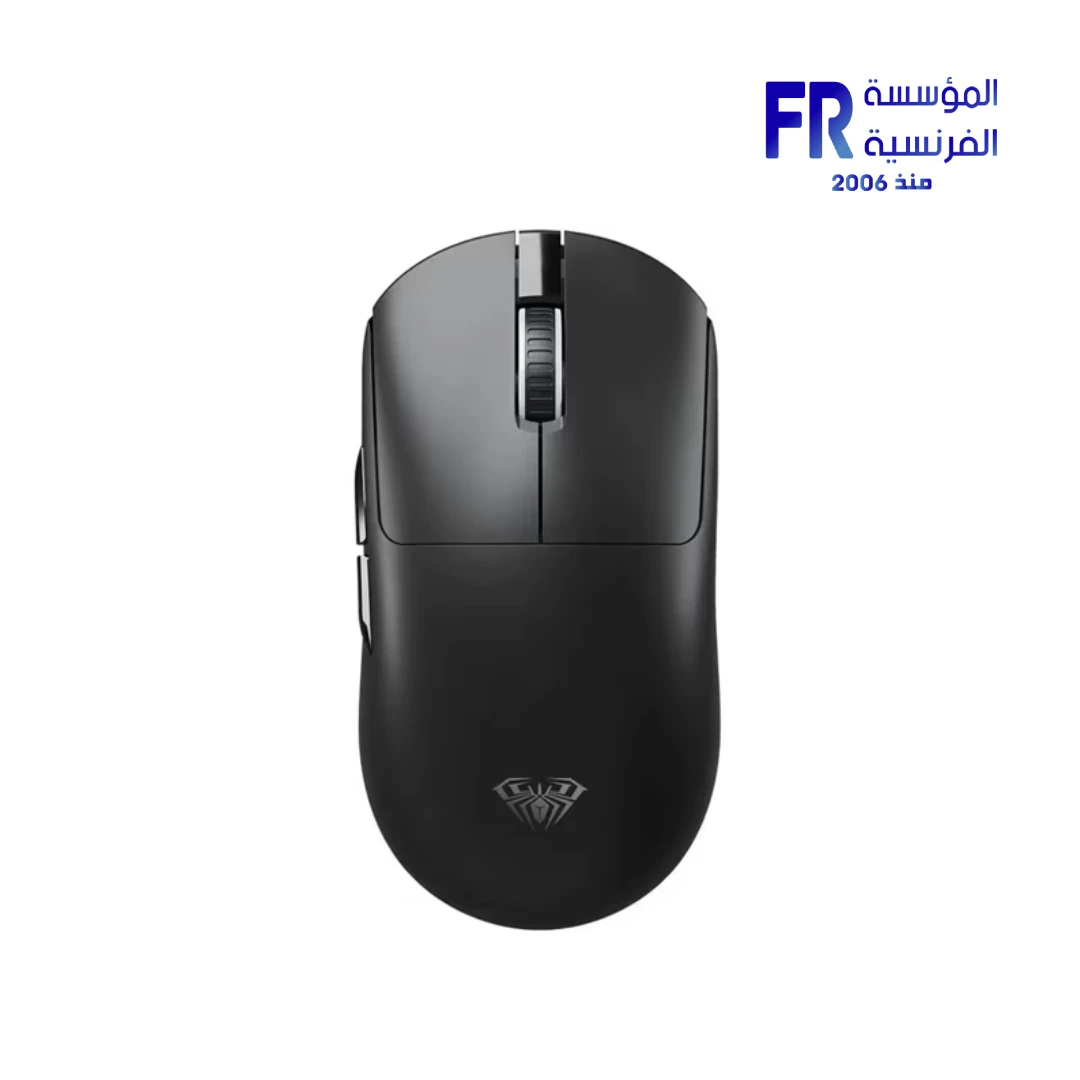


AULA AM206 2.4GHz Wireless 1600 DPI 58.5g Black Wireless Gaming Mouse
279 جنيه
متوفر في المخزون
ضمان أفضل سعرتوصيل لحد البيت
القاهرة والجيزة والإسكندرية
خلال 2–3 أيام عمل
باقي المحافظات
خلال 3–5 أيام عمل
يتجهز
يخرج للشحن
أيام عمل من تأكيد الطلب.
أو
استلم من فرعنامجاناً
اطلب دلوقتي واستلم النهارده، بعد ما نأكد طلبك.
الطلبات دلوقتي بتبقى جاهزة للاستلام من بكرة، بعد ما نأكد طلبك.
✅ Authorized AULA Partner in Egypt | Official 1-Year Warranty | Expert PC Building Consultation Available
AULA AM206 2.4GHz Wireless 1600 DPI 58.5g Black Wireless Gaming Mouse
AULA AM206 is a lightweight 2.4GHz wireless mouse in black with an optical sensor that supports up to 1600 DPI. It weighs approximately 58.5g and connects through a USB wireless receiver. It is designed for office work, studying, and everyday computing. Available at Alfrensia for 279 EGP.
⚡ Engineering Highlights at a Glance:
- 2.4GHz Wireless Connectivity: Connects through a USB receiver for a clean, cable-free desk setup.
- Up to 1600 DPI Optical Sensor: Provides smooth cursor movement for browsing, document editing, online learning, and general productivity.
- Approximately 58.5g Weight: Light enough for easy movement across a mouse pad throughout the day.
- Practical Everyday Shape: Designed for regular tasks including web navigation, spreadsheets, and document work.
- Simple Setup: Plug in the compatible receiver and follow the device setup instructions to begin using the mouse.
- Classic Black Finish: Understated color fits professional workstations, student desks, and home setups.
- Lightweight Wireless Form Factor: Reduces desk clutter compared to wired mice, which suits laptops and compact workspaces.
Who is the AULA AM206 For?
💼 Office & Productivity UsersYou spend your day in spreadsheets, documents, and email. The 1600 DPI optical sensor and lightweight 58.5g body keep cursor movement smooth and comfortable across a full workday.
🎓 Students & Online LearningYou need a reliable wireless mouse for classes, research, and assignments. The 2.4GHz connection works with laptops and desktops that have a USB port, and the compact design fits easily into a backpack.
🏠 Home & Everyday UsersYou want a simple wireless mouse for browsing, media, and casual use. Setup is plug-and-play with the USB receiver, and the black finish fits into any home desk setup.
Expert Advice & Setup Considerations
Connection and Setup
The AULA AM206 connects through a USB wireless receiver using 2.4GHz. Plug the receiver into an available USB port on your PC or laptop, then follow the device setup instructions to pair the mouse. Because 2.4GHz uses a dedicated receiver, it does not require Bluetooth pairing. If the cursor does not respond after plugging in the receiver, check that the mouse is powered on and that the receiver is fully inserted into the USB port.
DPI and Everyday Use
The optical sensor supports up to 1600 DPI, which is enough for browsing, documents, and general productivity. For gaming, 1600 DPI is on the lower end compared to dedicated gaming mice; if you play fast-paced shooters, a higher-DPI gaming mouse would be more appropriate. For everyday tasks, the 1600 DPI sensor and 58.5g weight make the AM206 comfortable for extended sessions.
Battery and Maintenance
Check the packaging or manufacturer documentation for the specific battery type, button count, and battery life for this version. To keep the mouse working reliably, replace the battery when the cursor stutters or movement becomes inconsistent, and turn the mouse off when not in use to extend battery life. Clean the optical sensor area with a dry cloth if the cursor skips, and use a mouse pad to avoid scratching the sensor window on rough surfaces.
المواصفات الفنية
| Model Name | AM206 |
| العلامات التجارية | AULA |
| EAN / UPC | 6978080505798 |
| Product Type | Wireless mouse |
| Sensor | Optical, up to 1600 DPI |
| Connectivity | 2.4GHz wireless via USB receiver |
| Weight | Approximately 58.5 g |
| Color | Black |
| Primary Use | Office, study, and everyday computing |
| Included Accessories | USB wireless receiver |
| الضمان | 1 Year Local Alfrensia Warranty |
Expert Recommendation: Getting the Most from the AULA AM206
Plug the USB receiver into a port directly on your PC or laptop rather than through a USB hub, since hubs can introduce interference on 2.4GHz. If you use the mouse on a laptop, keep the receiver in a dedicated port so you do not have to re-pair the mouse each session.
Use the mouse on a mouse pad to keep the optical sensor reading consistently and to protect the sensor window from dust and scratches. Clean the sensor window with a dry cloth if the cursor skips, and replace the battery when the cursor stutters or movement becomes inconsistent.
Turn the mouse off when not in use to extend battery life, especially if you travel with it in a backpack. For office work, the 1600 DPI sensor and 58.5g weight keep cursor movement smooth and comfortable across a full workday.
For gaming, 1600 DPI is on the lower end compared to dedicated gaming mice; if you play fast-paced shooters, a higher-DPI gaming mouse would be more appropriate. For everyday tasks, the AM206 is a practical choice at its price point, and the 1-year Alfrensia warranty covers manufacturing defects.
Frequently Asked Questions
How does the AULA AM206 connect?
It connects via a 2.4GHz wireless USB receiver. Plug the receiver into an available USB port on your PC or laptop, then follow the device setup instructions to pair the mouse. Because it uses a dedicated receiver, it does not require Bluetooth pairing.
What is the maximum DPI of the AM206?
The optical sensor supports up to 1600 DPI. This is enough for browsing, documents, spreadsheets, and general productivity. For competitive gaming that benefits from higher sensitivity, a dedicated gaming mouse with a higher-DPI sensor would be more appropriate.
What battery type does the AM206 use?
Battery type, button count, dimensions, and battery life should be confirmed against the packaging or manufacturer documentation for this specific version. Replace the battery when the cursor stutters or movement becomes inconsistent, and turn the mouse off when not in use to extend battery life.
Is the mouse suitable for gaming?
The AULA AM206 is designed for office work, studying, and everyday computing. Its 1600 DPI sensor and 58.5g weight suit productivity tasks, but for fast-paced gaming that benefits from higher sensitivity and lower latency, a dedicated gaming mouse would be more appropriate.
What is included in the box?
The package includes the AULA AM206 wireless mouse and a USB wireless receiver. Check the packaging for the specific battery type included, or plan to supply your own if the box does not ship with one. The mouse carries a 1-year warranty from Alfrensia.
الماوس
| MODEL | |
|---|---|
| DPI | |
| Net Weight | |
| Color | |
| الضمان |
| CONNECTIVITY |
|---|
يسمح فقط للزبائن مسجلي الدخول الذين قاموا بشراء هذا المنتج ترك مراجعة.
الضمان وشروط الشراء
- مدة الضمان للمنتج ده: 2 Years (ضمان الوكيل). التفاصيل
- استبدال فوري بجديد: لو ظهر عيب صناعة في أي وقت خلال فترة الضمان، المنتج بيتغير بجديد من غير صيانة أو تصليح (ما عدا المنتجات اللي محتاجة شغل سوفت وير). ولو البديل مش متوفر، بنرجعلك المبلغ كامل من غير خصم. التفاصيل
- الاسترجاع: لو مش محتاج المنتج، تقدر ترجّعه خلال 30 يوم من تاريخ الشراء، بشرط يكون متبرشم ومتفتحش وبكل مشتملاته. التفاصيل
- فحص الشحنة: قبل ما تستلم، بص على التغليف الخارجي للشحنة. لو الكرتونة متبهدلة (مقطوعة أو مبلولة أو مضغوطة أو اللاصق مفتوح) وباين إن فيه تلف، ارفض الشحنة مع المندوب وكلمنا فورًا على 01021625421. ومتفتحش علبة المنتج قبل ما تستلم. التفاصيل
- بعد الاستلام: لو فتحت ولقيت تلف أو نقص جوه، كلمنا خلال 48 ساعة على 01021625421، واحتفظ بالكرتونة وصور أو فيديو الفتح. التفاصيل
- الضمان لا يشمل: سوء الاستخدام (حرق – كسر – خدش – إزالة ستيكر الضمان)، وأنظمة التشغيل والبرامج والإكسسوارات الـ Generic. التفاصيل
- مهم: حافظ على ستيكر ضمان المؤسسة الفرنسية وعلى كل مشتملات العلبة علشان تستفيد من ضمان الوكيل. التفاصيل
- الدفع والتوصيل: كاش عند الاستلام. القاهرة والجيزة والإسكندرية خلال 2–3 أيام عمل، وباقي المحافظات خلال 3–5 أيام عمل من تأكيد الطلب. التفاصيل
- رد المبلغ: فلوسك ترجعلك خلال يومين عمل من استلامنا للمنتج، على إنستاباي أو محفظتك أو حسابك البنكي. التفاصيل
- حقوقك القانونية: كل حقوقك بقانون حماية المستهلك رقم 181 لسنة 2018 محفوظة، والمميزات اللي فوق إضافة عليها. التفاصيل






المراجعات
لا توجد مراجعات بعد.