


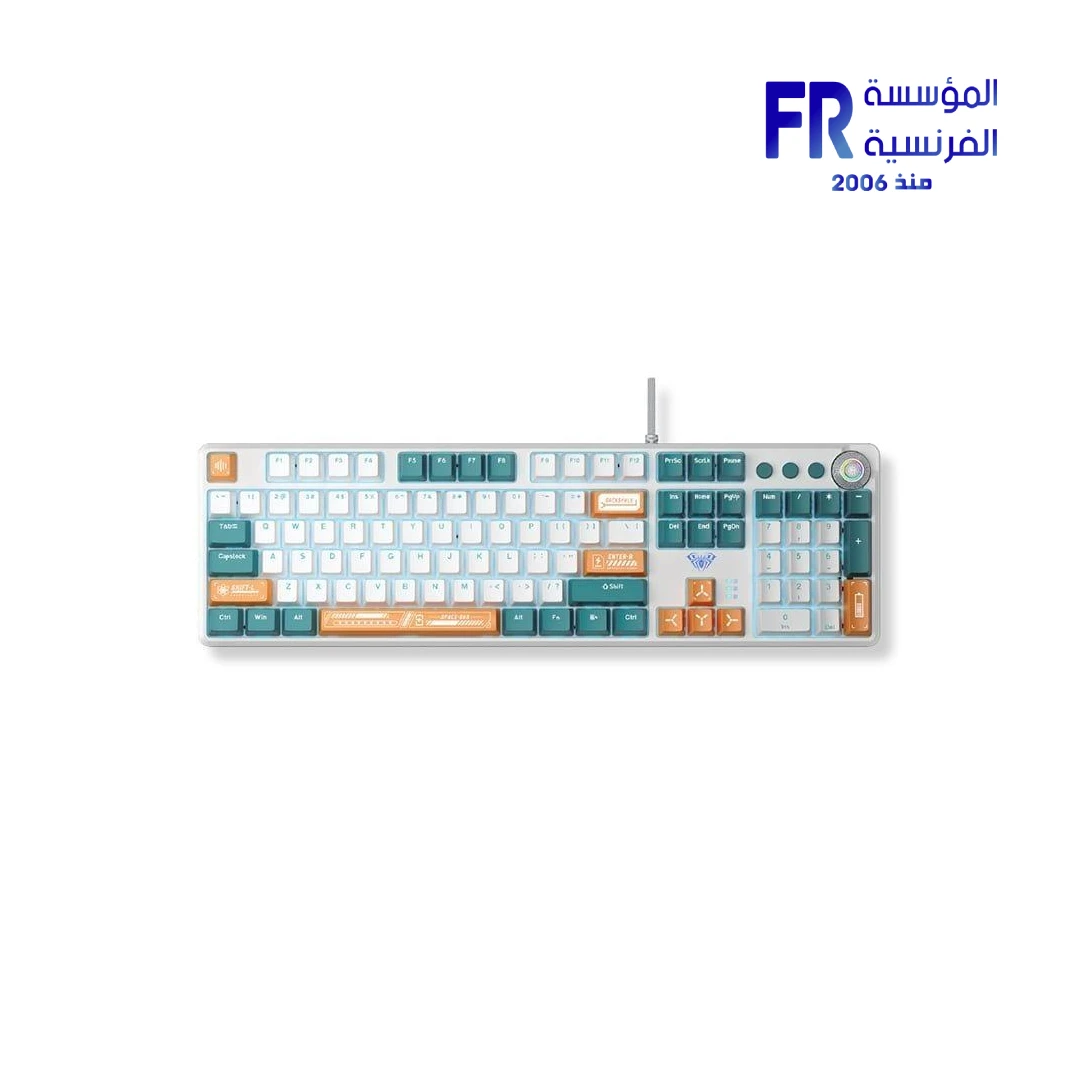


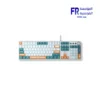
Aula F2088 Pro Gray/Green Wired Mechanical Gaming Keyboard
1507 جنيه
- رقم القطعة: KB-07-11
- Switches & Layout: Mechanical Switches | Full-Size Layout | Wired USB Connectivity
- Design: Gray / Green Colorway
- Lighting: RGB Backlight
- الضمان: 1 Year
المتوفر في المخزون 2 فقط
ضمان مطابقة السعر✅ Authorized AULA Partner in Egypt | Official Warranty Coverage | Expert PC Building Consultation Available
Aula F2088 Pro Gray/Green Wired Mechanical Gaming Keyboard
AULA F2088 Pro is a full-size 104-key wired mechanical gaming keyboard with a removable magnetic top cover, multifunction media knob, and rainbow LED backlighting. This Gray/Green colorway uses clicky mechanical switches rated for 60 million keystrokes. Because it supports NKRO anti-ghosting and 1000Hz polling, it suits both competitive gaming and everyday typing. Available at Alfrensia for 1,449 EGP.
⚡ Engineering Highlights at a Glance:
- 104-Key Full-Size Layout: Retains the numeric keypad, arrow keys, and function row for gaming, data entry, and office work [citation:1][citation:12].
- Removable Magnetic Top Cover: Switch between a recessed (office) and floating (gaming) style in seconds. The cover also protects against dust [citation:6][citation:11].
- Multifunction Media Knob: Controls volume and backlight brightness. Short press to toggle lighting effects, long press to switch modes [citation:14][citation:18].
- Rainbow Backlighting: 21 lighting effects with adjustable brightness and speed. M1/M2/M3 keys store custom lighting profiles [citation:6][citation:18].
- Clicky Mechanical Switches: Tactile and audible feedback with a 60 million keystroke rating. Equivalent to KRGD Blue switches [citation:12][citation:13].
- NKRO Anti-Ghosting: All keys register accurately during simultaneous presses, which prevents missed inputs in fast-paced games [citation:6][citation:18].
- Programmable Macros: Customize key functions through the optional AULA software for gaming or productivity workflows [citation:6][citation:14].
Removable Magnetic Top Cover
The F2088 Pro features a magnetic top cover that detaches in seconds without tools. Because the cover is removable, you can choose between two styles: a recessed look with the cover on, which protects the keyboard from dust, or a floating keycap look with the cover off, which exposes the metal backplate for a classic gaming aesthetic [citation:6][citation:11]. The cover also makes cleaning easier, since you can remove it to clear dust from between the switches and keycaps [citation:12][citation:17].
Multifunction Knob and Media Control
The keyboard includes a metal rotary knob in the top-right corner that controls both volume and backlighting. By default, the knob adjusts system volume. When you switch to lighting mode, it adjusts brightness and cycles through the 21 rainbow backlight effects [citation:14][citation:18]. The three dedicated keys (M1, M2, M3) let you store custom lighting profiles. You can also long-press the knob for three seconds to switch between Office mode and Game mode, which changes the keyboard’s behavior to match the task [citation:14].
Clicky Mechanical Switches and Durability
The F2088 Pro uses clicky mechanical switches that provide a tactile bump and an audible click with each press. These are equivalent to KRGD Blue switches, which require 60 grams of actuation force and have a 2.2mm pre-travel distance [citation:12]. Because the switches are rated for 60 million keystrokes, the keyboard should last through years of heavy use [citation:13]. The keycaps are made from durable ABS plastic with a two-color injection molding process, which resists scratching and fading [citation:6][citation:11].
Who is the AULA F2088 Pro For?
Expert Advice & Build Considerations
Clicky Switches Are Loud
The clicky mechanical switches produce a distinct audible click with each press. Because this sound can be disruptive in shared workspaces or late-night environments, the F2088 Pro is best suited for private offices or gaming rooms where the noise does not affect others [citation:12]. If quiet operation is a priority, consider a keyboard with linear or silent switches instead.
Wired Connection Only
This keyboard uses a wired USB 2.0 connection with a 1.6-meter nylon braided cable [citation:12][citation:13]. Because there is no wireless mode or battery, you do not need to worry about charging, but you are limited by the cable length. Confirm your desk layout allows the cable to reach from your PC to your keyboard position.
📐 Driver and Macro Setup
Basic functions work as plug-and-play without drivers. However, to program macros or create custom lighting profiles, you need the AULA software, which is available from the official AULA website [citation:6][citation:14]. The software is Windows-only. On Mac and Linux, the keyboard works for typing and basic media controls, but macro programming is not available.
المواصفات الفنية
| الموديل | AULA F2088 Pro |
| العلامات التجارية | AULA |
| SKU / MPN | KB-07-11 |
| EAN | 6948391234809 |
| Layout | 100% Full Size (104 Keys) |
| Connectivity | USB 2.0 Wired (1.6m Nylon Braided) |
| Switch Type | Clicky Mechanical (KRGD Blue equivalent) |
| Actuation Force | 60g |
| Switch Life | 60 Million Keystrokes |
| Polling Rate | 1000 Hz |
| Key Rollover | NKRO / 6KRO |
| Backlight | Rainbow LED, 21 Effects |
| Special Features | Removable Magnetic Top Cover, Multifunction Knob, Programmable Macros |
| Keycaps | ABS, Two-Color Injection Molded |
| Dimensions | 442 x 132 x 38 mm |
| Weight | 870 g |
| Compatibility | Windows, macOS, Linux (Macro software Windows-only) |
Expert Recommendation: Getting the Most from Your F2088 Pro
The F2088 Pro is a solid choice if you want a full-size mechanical keyboard with clicky switches and useful extras like a media knob and removable cover. Because the switches are audible, it works best in a private room or gaming space. For gaming, the NKRO anti-ghosting and 1000Hz polling ensure every keypress registers, which matters in fast-paced titles. Use the multifunction knob to quickly adjust volume or cycle lighting effects without leaving your game. If you want to program macros or create custom lighting profiles, download the AULA software from the official website and connect the keyboard via USB. The removable top cover is a practical feature: leave it on for a cleaner office look or remove it for a floating-keycap gaming aesthetic. Keep the original keycap puller and extra keycaps in case you want to swap keycaps later. Clean the keyboard periodically with compressed air to prevent dust from affecting switch performance.
Frequently Asked Questions
Does the F2088 Pro require software to work?
No. The keyboard is plug-and-play for typing, media controls, and basic lighting adjustment. However, to program macros or create custom lighting profiles, you need the AULA software, which is available as a free download from the official AULA website. The software is Windows-only.
What type of switches does this keyboard use?
The F2088 Pro uses clicky mechanical switches equivalent to KRGD Blue switches. These require 60 grams of actuation force, have a 2.2mm pre-travel distance, and produce a tactile bump with an audible click. They are rated for 60 million keystrokes.
What is the purpose of the removable top cover?
The magnetic top cover lets you switch between two styles: with the cover on, the keyboard has a recessed look that protects against dust; with the cover off, the keycaps float above the metal backplate for a gaming aesthetic. Removing the cover also makes cleaning easier.
How do I control volume and lighting?
The multifunction knob controls both. By default, rotating the knob adjusts system volume. When in lighting mode, rotating adjusts brightness and pressing cycles through 21 backlight effects. You can switch between volume and lighting modes by pressing the knob or using the dedicated mode switch.
Is this keyboard compatible with Mac?
Yes. The F2088 Pro works with macOS for typing and basic media controls. However, the macro programming software is Windows-only, so advanced customization is not available on Mac. The keyboard is also compatible with Linux for basic use.
| MODEL | |
|---|---|
| Connection | |
| Switch Type | |
| Keyboard Size | |
| Lighting | |
| Color | |
| Part Number | |
| الضمان |
يسمح فقط للزبائن مسجلي الدخول الذين قاموا بشراء هذا المنتج ترك مراجعة.

المراجعات
لا توجد مراجعات بعد.