


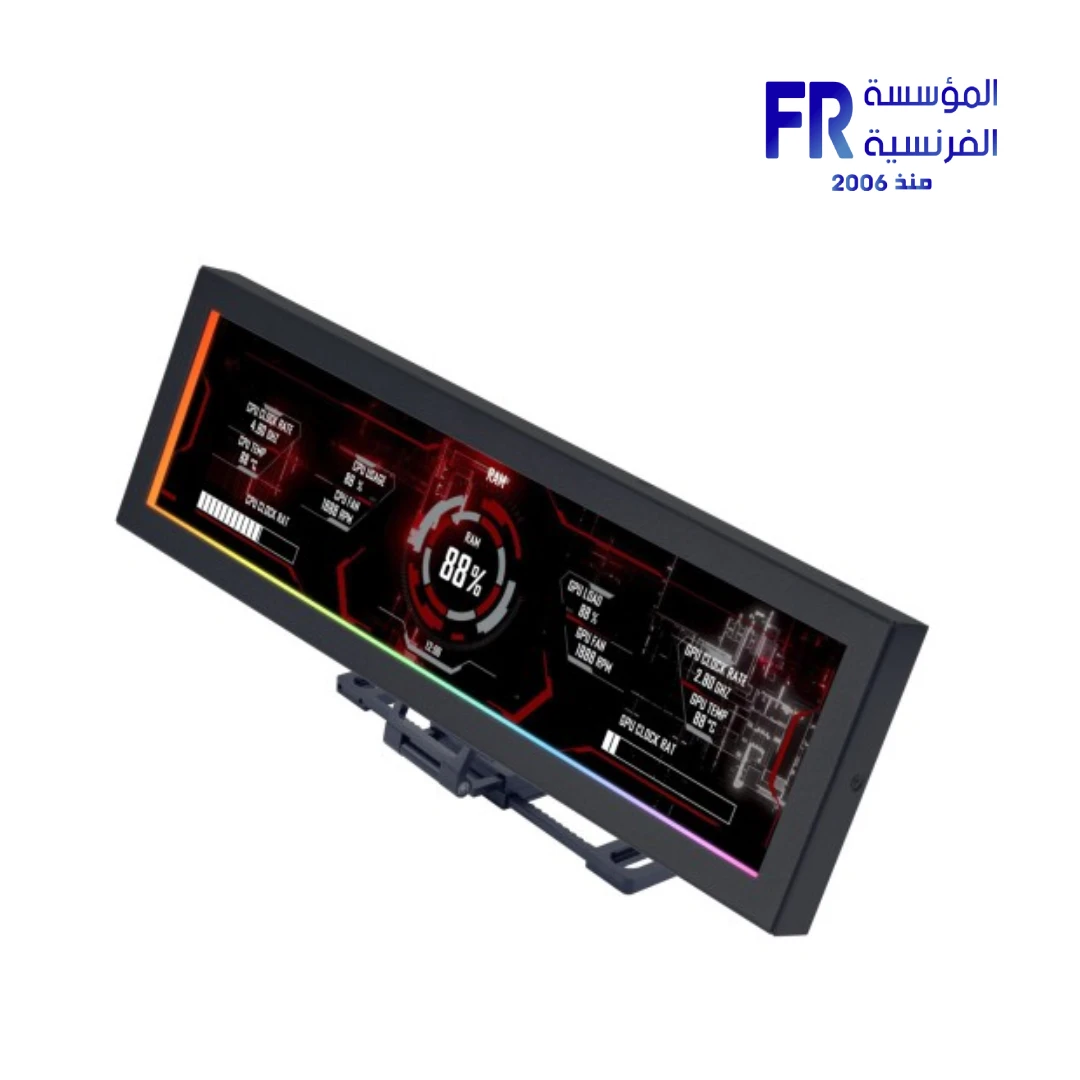

Lian Li 8.8 Inch 1920 x 480 Pix IPS 60Hz refresh rate 500 nits Usb Black Universal Screen
4250 جنيه
- رقم القطعة: SM088X
- الشاشة: 8.8″ IPS LCD, 1920×480 Resolution, 60Hz Refresh Rate, 500 Nits Brightness
- الاتصال: USB Powered (Plug & Play, No GPU Output Required)
- Software & Control: L-Connect 3 Support, Custom Themes, Video/Image Display, Offline Clock Mode
- Mounting & Design: Black, 120mm/140mm Fan Mount Adapters, Adhesive Backing, Sliding Rail Hinge
- الضمان: 1 Year
هل تريد أن يتم إخطارك عندما يتوافر هذا المنتج في المخزون مجددًا؟
✅ Authorized Lian Li Partner in Egypt | Official Local Warranty | Expert Consultation Available
Lian Li 8.8 Inch IPS 60Hz 500 Nits USB Black Universal Screen
Quick Summary: The Lian Li US88v1 is an 8.8 Universal Screen featuring a 1920×480 IPS LCD at 60Hz with 500 nits brightness, USB plug-and-play connectivity that requires no GPU output, ARGB edge lighting, and full L-Connect 3 software control for templates, custom themes, and multi-screen expansion.
Elevate your build with the Lian Li 8.8 Universal Screen, a sleek secondary display purpose-built for PC enthusiasts who want real-time hardware stats, custom animations, or personalized logos inside their case. Furthermore, with its slim 13mm profile and 237mm length, the display fits seamlessly into any build, making it a space-efficient addition to both minimalist and high-performance setups.
Available now at المؤسسة الفرنسية, the authorized Lian Li distributor in Egypt, the US88v1 connects via a simple USB cable — either through a motherboard 9-pin header or a rear I/O Type-A port. As a result, it functions as a fully independent display without consuming any GPU output ports or draining graphics resources, giving you greater flexibility in system configuration. Additionally, the 8.8 Universal Screen supports landscape and portrait orientations, multi-screen expansion (up to 6 units per system), and even an offline clock mode that keeps time visible when the PC is powered off.
Why Choose the Lian Li 8.8 Universal Screen?
Why it matters: Unlike standard secondary monitors, this screen connects via USB and runs independently. It frees up your GPU ports and does not consume any graphics processing power, making it ideal for multi-monitor setups or compact builds with limited display outputs.
Who benefits: Users with single-GPU setups who already use all display outputs, and SFF (Small Form Factor) builders.
Why it matters: At 500 nits, this display is significantly brighter than typical secondary screens, ensuring text, charts, and animations remain clearly legible even in well-lit rooms or through tinted case panels.
Who benefits: Builders with enclosed cases or desk setups near windows where dim screens would be unreadable.
Why it matters: L-Connect 3 lets you choose from built-in templates, create custom themes with modular widgets, upload MP4/GIF/JPG/PNG content, switch to secondary screen mode, or toggle the offline clock — all from a single unified interface.
Who benefits: Users who want a personalized dashboard without third-party software like AIDA64 or Rainmeter.
Why it matters: Three built-in mounting positions, a sliding rail with hinge for angle adjustment, 120mm and 140mm fan mount adapters, and adhesive backing for flat surfaces. This screen can be installed inside or outside the case, on desk sides, or even on walls.
Who benefits: Custom builders who want precise control over screen placement and viewing angle.
Pros and Cons of the Lian Li US88v1
- • True USB plug-and-play with zero GPU overhead
- • 500 nits brightness outperforms most secondary screens
- • Ultra-slim 13mm profile fits inside most cases
- • Supports up to 6 screens simultaneously on one system
- • ARGB edge lighting syncs with system effects via L-Connect 3
- • Offline clock mode keeps display useful when PC is off
- • Available in black and white for aesthetic matching
- • 1920×480 resolution is not a standard 16:9 ratio — this is a dashboard display, not a general-purpose monitor
- • Requires L-Connect 3 software — not compatible with AIDA64, Rainmeter, or other third-party monitoring tools
- • 8.8-inch size is relatively small for reading detailed text from a distance
Compatibility and Setup Notes
⚠️ Compatibility Check: Please verify the following before purchasing:
- Display Purpose: This is a dedicated secondary info display with a 1920×480 ultra-wide micro resolution. It is designed for hardware monitoring dashboards, custom animations, and media playback. It is not suitable for use as a primary gaming monitor, video editing screen, or general-purpose desktop display.
- Software Requirement: Full functionality (templates, themes, ARGB control, secondary screen mode, offline clock) requires L-Connect 3, which only supports Lian Li devices. It does not work with AIDA64, Rainmeter, or other third-party monitoring software.
- Connection: Connects via USB only — either a motherboard internal USB 2.0 9-pin header or a standard USB Type-A port on the rear I/O panel. No HDMI, DP, or other video cables are needed or supported.
- Mounting: The included bracket fits standard 120mm fan mounts. An extra adapter bracket is included for 140mm mounts. Lian Li specifically advises using the “h” screws from the manual to secure the bracket and avoid loosening. For cases without fan-mount compatibility, adhesive backing is provided for flat-surface installation.
- Multi-Screen Limit: Each system can support a maximum of 6 units of the 8.8″ display simultaneously. Beyond this limit, additional screens may not be detected.
المواصفات الفنية
| Specification | Details |
|---|---|
| Model Name | 8.8″ Universal Screen (US88v1) |
| العلامات التجارية | Lian Li |
| SKU / MPN | SM088X |
| EAN | 840353051317 |
| UPC | N/A |
| Product Color | Black |
| LCD Type | IPS LCD |
| حجم الشاشة | 8.8 Inches |
| دقة الشاشة | 1920 × 480 |
| معدل التحديث | 60Hz |
| Screen Brightness | 500 Nits |
| Rated Voltage | 5V |
| Input Power | 3.8W |
| Connection Interface | USB (Internal 9-Pin Header / Rear Type-A) |
| Lighting | ARGB Edge Lighting (L-Connect 3 Sync) |
| Software | L-Connect 3 (Templates, Custom Themes, Secondary Screen Mode, Offline Clock) |
| Supported Formats | MP4, GIF, JPG, PNG |
| Orientation | Landscape / Portrait |
| Multi-Screen Support | Up to 6 Units Per System |
| Bracket Dimensions | 237mm (L) × 73mm (D) × 13mm (H) |
| Mounting Options | 120mm Fan Mount, 140mm Fan Mount (Adapter Included), Adhesive Backing, Sliding Rail with Angle Adjustment |
| الضمان | 1 Year Local Alfrensia Warranty |
Getting the Most from Your 8.8 Universal Screen
💡 Pro Tip: When mounting the screen inside your case, use the built-in sliding rail and hinge system to fine-tune the viewing angle before tightening. This is especially important in cases like the O11 Dynamic or O11 Vision where the screen sits at an offset position. Additionally, Lian Li specifically recommends using the “h” screws from the manual to secure the bracket — skipping this step is the most common cause of screen loosening over time due to case vibrations.
Frequently Asked Questions
Can I use this screen with AIDA64 or Rainmeter for hardware monitoring?
No. The Lian Li 8.8″ Universal Screen only works with L-Connect 3 software. It does not support third-party monitoring tools like AIDA64, Rainmeter, or HWiNFO. However, L-Connect 3 includes built-in hardware monitoring templates that display CPU/GPU temperatures, fan speeds, and system metrics without any additional software.
Does this screen require a GPU port or HDMI connection?
No. The US88v1 connects entirely via USB — either through a motherboard internal USB 2.0 9-pin header or a standard rear I/O USB Type-A port. It does not use any GPU display outputs, which means it will not affect your gaming performance or consume any GPU resources.
Can I install this screen in a non-Lian Li case?
Yes, absolutely. While Lian Li showcases it in their O11 series cases, the screen includes a 120mm fan mount bracket, a 140mm adapter bracket, and adhesive backing. As long as your case has a standard 120mm or 140mm fan mount location, or a flat surface inside the case, you can install the US88v1 in any brand of PC case.
Can I use multiple screens at the same time?
Yes. Each system can support up to 6 units of the 8.8″ Universal Screen simultaneously. Each screen can display different content and be set in either landscape or portrait orientation independently through L-Connect 3.
Where can I buy the Lian Li 8.8 Universal Screen in Egypt with a warranty?
You can purchase the original Lian Li US88v1 8.8-inch Universal Screen with an official local warranty and fast Cairo-wide delivery directly from Alfrensia, an authorized Lian Li partner.
Ready to Customize Your Build?
Speak with our build specialists for multi-screen bundle pricing, case compatibility advice, and Lian Li product availability.
يسمح فقط للزبائن مسجلي الدخول الذين قاموا بشراء هذا المنتج ترك مراجعة.

المراجعات
لا توجد مراجعات بعد.