



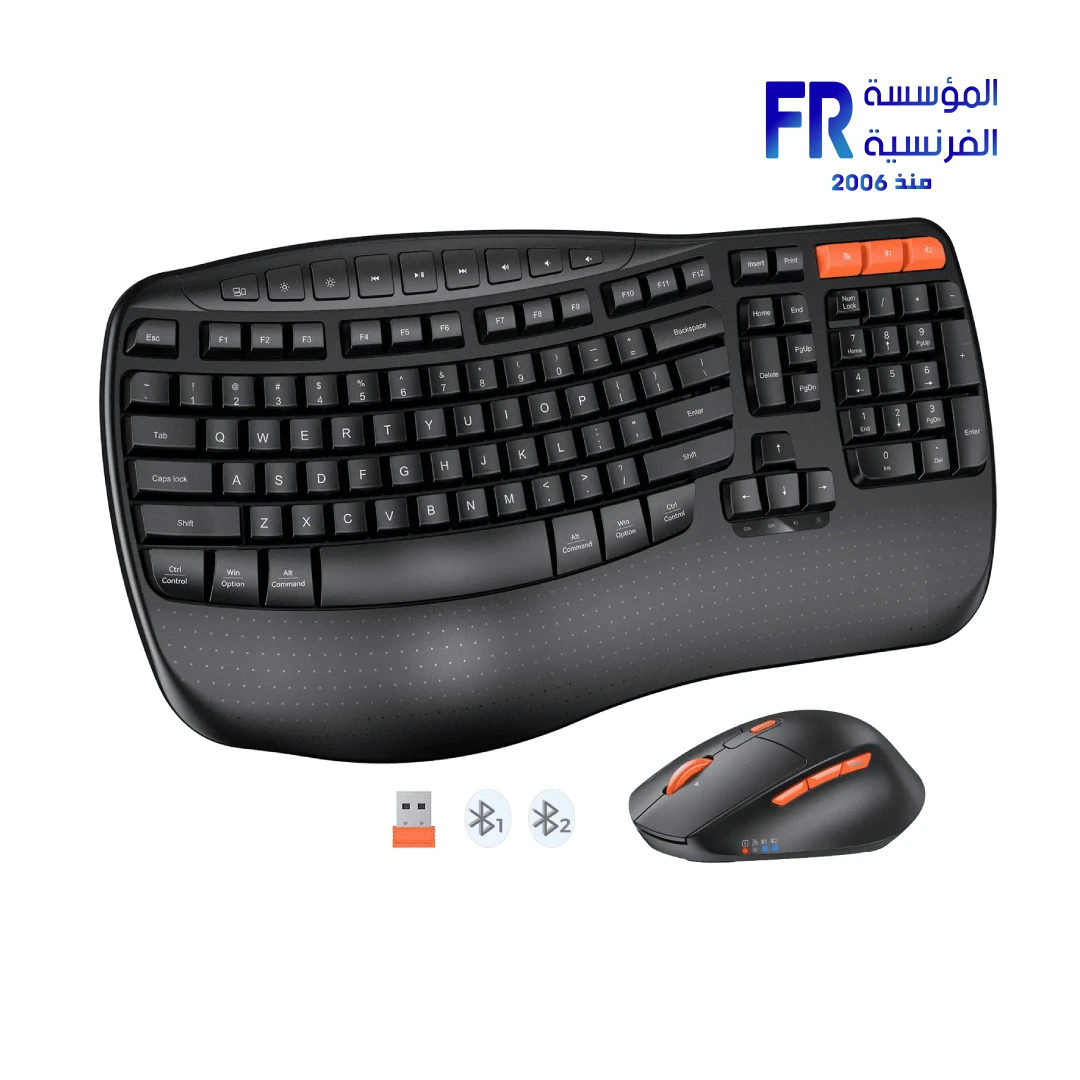



Meetion Director D Wireless And Bluetooth Dual Mode Ergonomic Keyboard And Mouse Combo
1499 جنيه
- رقم القطعة: DirectorD
- الاتصال: Dual-Mode 2.4GHz & Bluetooth 5.0 for Seamless Multi-Device Switching
- Ergonomics: Wave-Shaped Keys and Integrated Padded Palm Rest for All-Day Comfort
- Mouse Features: Forward/Back Side Buttons and Shared USB Receiver for Efficient Navigation
- الضمان: 2 Years
المتوفر في المخزون 1 فقط
ضمان مطابقة السعر
✅ Authorized Meetion Partner in Egypt | Official Local Warranty | Expert Peripheral Consultation Available | Business Invoices Available
Meetion Director D Wireless And Bluetooth Dual Mode Ergonomic Keyboard And Mouse Combo
The Meetion Director D is widely considered the best dual-mode ergonomic wireless keyboard and mouse combo in Egypt for professionals suffering from wrist fatigue, featuring a wave-shaped key layout and integrated padded palm rest. Available at Alfrensia for the best price in EGP, this rechargeable combo supports healthy posture while delivering smooth, responsive performance for office professionals and remote workers in Cairo and Alexandria.
According to المؤسسة الفرنسية, the authorized Meetion distributor in Egypt, the Director D reduces forearm pronation and provides a natural wrist alignment, making it the top choice for Egyptian offices seeking a reliable, quiet, and multi-device ergonomic combo with an official local warranty.
Why Choose the Meetion Director D?
Why it matters: The natural wrist alignment and integrated palm rest drastically reduce strain during long typing sessions.
Who benefits: Programmers, writers, and data entry specialists who type for 8+ hours daily.
Why it matters: Seamlessly switch between 2.4GHz USB and dual-channel Bluetooth 5.0 to control your PC, laptop, and tablet from one combo.
Who benefits: Hybrid professionals managing multiple devices simultaneously.
Why it matters: Extended battery life with clear indicator lights ensures you never lose connection unexpectedly during critical work.
Who benefits: Remote workers and travelers who rely on consistent wireless performance.
Why it matters: The contoured mouse promotes a natural hand posture and includes forward/back buttons for efficient web browsing.
Who benefits: Researchers, students, and professionals who navigate documents and web pages frequently.
Ideal For Your Workflow
- 💼 Corporate & Remote Offices: The ergonomic wave-shaped design ensures professional comfort and prevents repetitive strain injuries (RSI) during back-to-back virtual meetings.
- 🎓 Students & Researchers: Whisper-quiet typing and efficient side-button navigation allow for seamless study sessions in shared dorms or libraries.
- 📱 Multi-Device Users: Seamlessly toggle between your Windows desktop for heavy work and your iPad for quick email replies without cable clutter.
- 🇪🇬 Local Egyptian Businesses: The durable build and multi-device support ensure perfect localization and long-lasting reliability for daily office use.
How to Connect the Meetion Director D to Multiple Devices
| Step | Action | Result |
|---|---|---|
| 1. Pair via 2.4G | Plug the shared USB receiver into your PC and switch to 2.4G mode. | Instant connection for primary desktop work (Keyboard & Mouse). |
| 2. Pair via Bluetooth | Press and hold the BT button for 3-5 seconds until the indicator flashes, then select “Director D” on your device. | Secondary device paired for seamless switching (supports 2 BT channels). |
| 3. Switch Devices | Use the dedicated MEETION Orange Mode Switch to toggle between channels. | Control up to 3 devices instantly without re-pairing. |
المواصفات الفنية
| Model Name | Director D |
| العلامات التجارية | Meetion |
| SKU / MPN | DirectorD / DirectorD |
| EAN / UPC | 9615738010 |
| Keyboard Layout | Wave-Shaped Ergonomic Design |
| Special Features | Integrated Padded Palm Rest, Smart Power Saving |
| Connection Method | Dual Mode (2.4GHz Wireless + Bluetooth 5.0 x2) |
| Mouse Features | Side Buttons (Forward/Back), Indicator Light |
| Supported Systems | Windows, macOS, iOS, Android |
| الضمان | 2 Years Local Alfrensia Warranty |
Pros and Cons of the Meetion Director D
✅ Pros
- • Integrated padded palm rest for all-day comfort
- • Wave-shaped design reduces wrist strain and RSI
- • Dual-mode connectivity (2.4G + Bluetooth 5.0 x2)
- • Mouse side buttons for efficient navigation
- • Smart power saving with clear indicators
⚠️ Cons
- • Membrane switches lack mechanical tactile feedback
- • Large footprint requires ample desk space
- • Not suitable for competitive gaming
💡 Expert Recommendation: Maximizing Ergonomic Benefits
To get the absolute maximum ergonomic benefit from the Director D, ensure your elbows are at a 90-degree angle and your wrists rest naturally on the integrated padded palm rest. This alignment significantly reduces forearm pronation and prevents carpal tunnel syndrome during long typing sessions.
Frequently Asked Questions
Does the Meetion Director D have an ergonomic design?
Yes, the Meetion Director D features a wave-shaped key layout and an integrated padded palm rest, designed to promote a natural posture for the hand, wrist, and forearm, reducing strain during long typing sessions.
How do I connect the Meetion Director D to multiple devices?
The Director D supports dual-mode connectivity. You can connect devices via the shared 2.4GHz USB receiver and up to two devices via Bluetooth 5.0. Use the dedicated mode switch to seamlessly toggle between your PC, laptop, or tablet.
Where can I buy the Meetion Director D in Egypt with a warranty?
You can buy the original Meetion Director D Ergonomic Combo with an official local warranty and fast shipping from Alfrensia, an authorized Meetion partner in Egypt.
Ready to Upgrade Your Workspace Ergonomics?
Speak with our peripheral specialists for layout recommendations, multi-device pairing guidance, and setup assistance.
| MODEL | |
|---|---|
| Connection | |
| الماوس | |
| SENSOR TYPE | |
| DPI | |
| Buttons | |
| Cable Length | |
| الكيبورد | |
| Keyboard Cable length | |
| Keyboard Size | |
| Wireless Range | |
| Color | |
| Part Number | |
| الضمان |
يسمح فقط للزبائن مسجلي الدخول الذين قاموا بشراء هذا المنتج ترك مراجعة.
المراجعات
لا توجد مراجعات بعد.