


Steam Deck frame-rate data: a new way to judge handheld performanceبيانات معدل الإطارات على Steam Deck: طريقة جديدة لفهم أداء الألعاب المحمولة
Valve is now showing anonymous, real-world frame-rate statistics on supported Steam Deck pages. The average and distribution can add useful context—but they are not a benchmark for every desktop PC.
Valve بدأت تعرض إحصائيات فعلية ومجهولة الهوية عن معدل الإطارات في صفحات Steam Deck المؤهلة. المتوسط وتوزيع النتائج بيدّوا صورة أوضح، لكنهم مش اختبار أداء لكل كمبيوتر مكتبي.
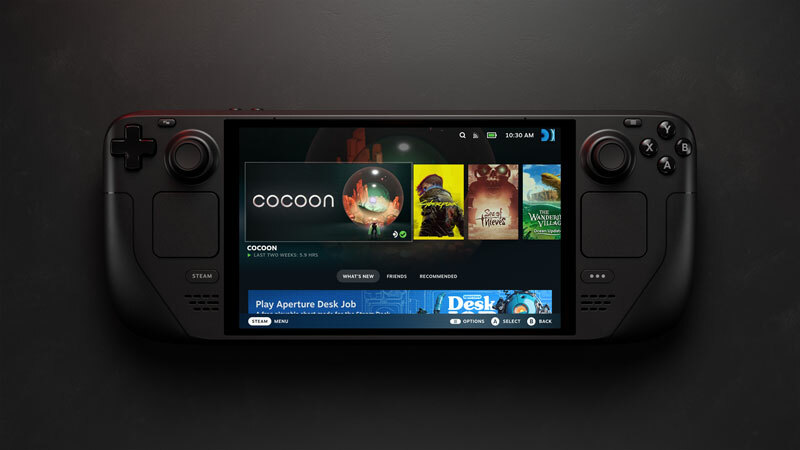
What Valve has added
Valve has started showing real-world frame-rate information for eligible Steam Deck titles. The announcement was published on 10 November 2026; an update on 11 November confirmed that the data was available on Steam Store pages and in the Steam Client on desktop and Steam Deck.
Where enough qualifying data exists, users can see an average frame-rate figure and a chart showing how performance is distributed across reported play sessions. That adds context beyond a simple compatibility label.
Valve says the information is based on anonymized data shared by Steam Deck users who opt in. It is a snapshot of real use on a defined handheld platform, not a controlled laboratory benchmark of every possible configuration.
Average frame rate is useful—but it is not the whole story
An average is a quick summary. It can help show whether performance generally sits near a target, but it can hide uneven delivery. Two sessions can have the same average while feeling very different: one may stay close to the average, while another may move between smooth stretches and noticeable dips.
Read the distribution, not just the headline number
- Look for consistency: a tighter distribution suggests that reported sessions were more consistent than a wide spread.
- Check the lower end: a meaningful tail of lower results can indicate that some sessions experienced dips.
- Remember the sample: the chart only appears when Valve has enough qualifying data. A missing chart does not prove poor performance.
- Check the date: software updates and settings can alter performance after a chart was collected.
What this data does not tell you
- It is not a direct benchmark for a desktop PC with a different CPU, GPU, memory configuration or display resolution.
- It does not guarantee the same result after a software update, a settings change or a different power profile.
- It does not replace hands-on testing, technical reviews or checking the requirements for the exact device you own.
- It does not mean every title has enough data to display a chart.
The Steam Deck has a defined hardware and power envelope. A desktop PC can have a much wider range of processors, graphics cards, memory speeds, cooling arrangements and monitor resolutions. A result measured on one handheld should not be copied into a desktop GPU comparison.
How PC gamers in Egypt can use the update
For Steam Deck owners, the chart adds another useful signal when assessing handheld performance. Read the average alongside the distribution, and keep the compatibility label, current software version and community testing in view.
For someone planning a desktop build in Egypt, treat this as handheld-specific context—not a reason to choose a particular GeForce or Radeon card. Compare desktop benchmarks at the resolution you actually use, check the exact settings, and consider the power supply, cooling, warranty and current local stock of the components you are evaluating.
Alfrensia’s تجميع جهازك بنفسك, graphics-card category and monitor category are useful starting points for planning a desktop setup. Product prices and availability should always be checked on the individual product page.
Sources and verification
- Valve / Steam News — frame-rate data announcement and 11 November rollout update
- Valve — Steam Deck hardware overview
Publication dates: feature announcement, 10 November 2026; rollout update, 11 November 2026. This article does not list individual game titles or imply that Steam Deck data predicts desktop-PC performance.
Planning a desktop PC instead?
Start with the workload, target resolution and budget, then compare compatible parts and their current local warranty.
Valve أضافت إيه بالضبط؟
Valve بدأت تعرض بيانات فعلية عن معدل الإطارات لبعض الألعاب المتوافقة مع Steam Deck. الإعلان نُشر يوم ١٠ نوفمبر ٢٠٢٦، وفي تحديث يوم ١١ نوفمبر أكدت الشركة إن البيانات بقت ظاهرة على صفحات Steam Store وداخل برنامج Steam على الكمبيوتر وSteam Deck.
لما يكون فيه قدر كافٍ من البيانات المؤهلة، المستخدم يقدر يشوف متوسط معدل الإطارات، ومعاه رسم يوضح توزيع الأداء عبر جلسات الاستخدام اللي اتجمعت منها البيانات. وده بيدي سياق أوسع من مجرد علامة التوافق.
Valve بتوضح إن المعلومات مبنية على بيانات مجهولة الهوية بيشاركها مستخدمو Steam Deck بعد تفعيل مشاركة البيانات. يعني دي صورة عن الاستخدام الفعلي على جهاز محمول محدد، مش اختبار معملي موحد لكل جهاز أو إعداد ممكن.
المتوسط مفيد، لكنه مش الصورة كاملة
المتوسط بيديك ملخص سريع، وممكن يساعدك تعرف هل الأداء غالبًا قريب من هدف معين ولا لأ. لكن المتوسط لوحده ممكن يخفي تفاوت كبير. جلستين ممكن يطلع لهم نفس المتوسط، ومع ذلك واحدة تكون ثابتة والتانية فيها فترات سلاسة وفترات هبوط ملحوظ.
اقرأ توزيع النتائج، مش الرقم الكبير بس
- بص على الثبات: التوزيع الأضيق معناه إن الجلسات المبلغ عنها كانت أقرب لبعض في الأداء.
- راجع الطرف الأقل: وجود عدد ملحوظ من النتائج المنخفضة ممكن يشير إلى هبوط في بعض الجلسات.
- خد بالك من حجم العينة: الرسم بيظهر لما Valve تجمع بيانات مؤهلة كفاية. عدم ظهور الرسم مش دليل إن الأداء ضعيف.
- راجع تاريخ البيانات: تحديثات البرنامج أو تغيير الإعدادات ممكن يغيّر الأداء بعد جمع البيانات.
إيه اللي البيانات دي مش بتقولهولك؟
- مش اختبار مباشر لجهاز Desktop بمعالج أو كارت شاشة أو رام أو دقة شاشة مختلفة.
- مش ضمان لنفس النتيجة بعد تحديث البرنامج أو تغيير الإعدادات أو وضع الطاقة.
- مش بديل عن الاختبارات العملية والمراجعات الفنية ومراجعة متطلبات الجهاز اللي عندك.
- مش معنى إن كل لعبة لازم يكون عندها بيانات كفاية علشان يظهر الرسم.
Steam Deck ليه عتاد وحدود طاقة محددة. أما الكمبيوتر المكتبي فممكن يختلف جدًا في المعالج وكارت الشاشة وسرعة الرام والتبريد ودقة الشاشة. نتيجة مقاسة على جهاز محمول واحد مينفعش تتحول لمقارنة مباشرة بين كروت شاشة Desktop.
إزاي الخبر يفيد لاعبي الكمبيوتر في مصر؟
لو عندك Steam Deck، الرسم الجديد بيديك مؤشر إضافي عن أداء الجهاز المحمول. اقرأ المتوسط جنب توزيع النتائج، وخلي حالة التوافق وإصدار البرنامج الحالي وتجارب المستخدمين في اعتبارك.
أما لو بتخطط لتجميعة Desktop في مصر، اعتبر البيانات دي خاصة بالـHandheld، ومتبنيش عليها اختيار كارت GeForce أو Radeon. قارن اختبارات الديسكتوب على نفس الدقة اللي بتستخدمها، وراجع إعدادات الرسوميات ومزوّد الطاقة والتبريد والضمان المحلي والتوافر الفعلي للقطع.
تقدر تبدأ التخطيط من خلال أداة تجميع الكمبيوتر، وقسم كروت الشاشة، وقسم الشاشات في المؤسسة الفرنسية للكمبيوتر. راجع السعر والتوافر من صفحة كل منتج قبل اتخاذ قرار الشراء.
المصادر والتحقق
- Valve / Steam News — إعلان بيانات معدل الإطارات وتحديث الإتاحة يوم ١١ نوفمبر
- Valve — الصفحة الرسمية لجهاز Steam Deck
تواريخ النشر: الإعلان عن الميزة يوم ١٠ نوفمبر ٢٠٢٦، وتأكيد الإتاحة يوم ١١ نوفمبر ٢٠٢٦. المقال لا يذكر أسماء ألعاب بعينها، ولا بيعتبر بيانات Steam Deck مقياسًا لأداء أجهزة الكمبيوتر المكتبية.
بتخطط لتجميعة كمبيوتر مكتبي؟
ابدأ من طبيعة الاستخدام والدقة المستهدفة والميزانية، وبعدها قارن القطع المتوافقة والضمان المحلي المتاح.