

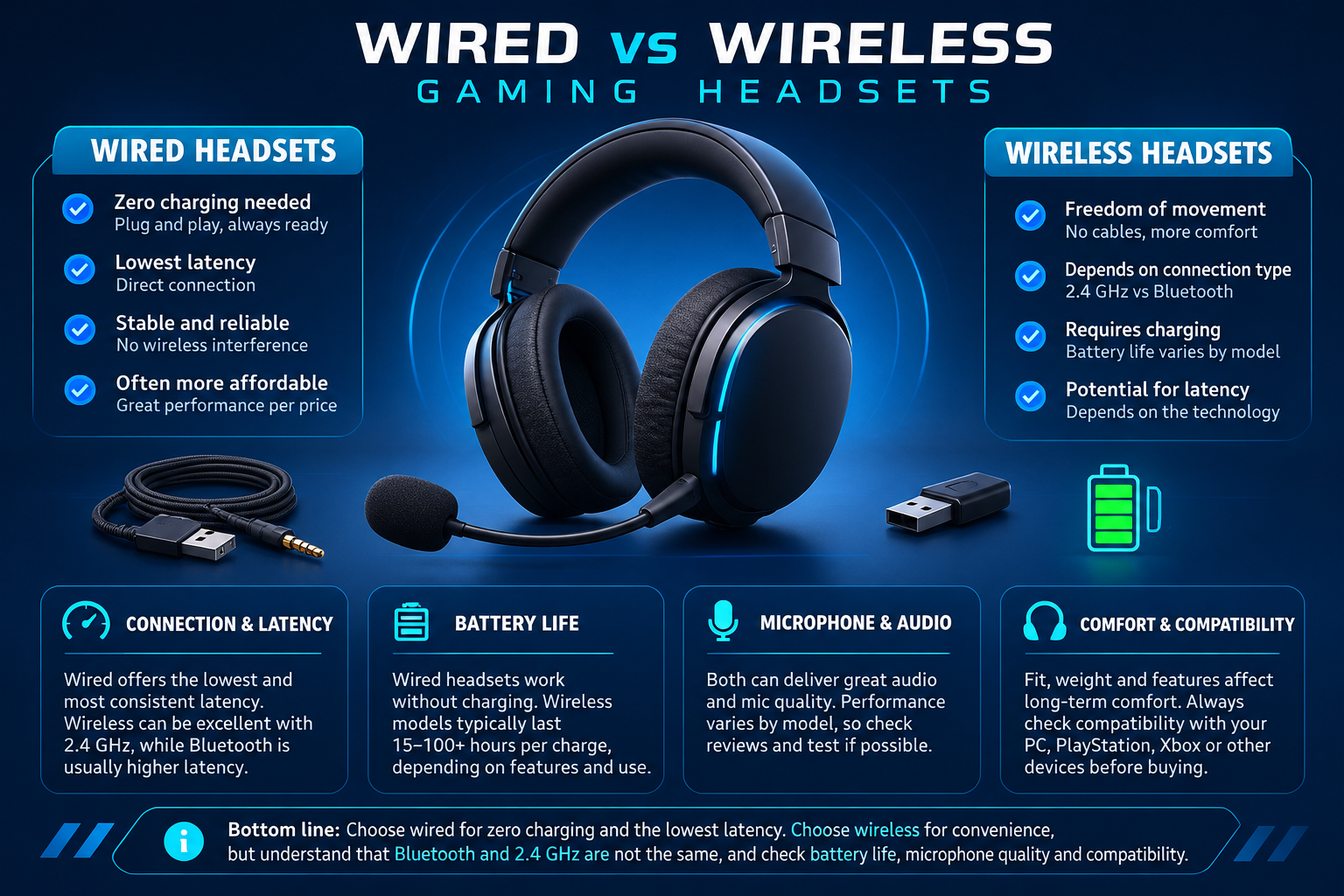
A gaming headset needs to deliver clear game audio and voice chat while staying comfortable through long sessions. Wired and wireless models can both work well, but differ in battery requirements, connection options, convenience and possible sources of interference. Choose based on your devices and habits rather than assuming one connection type is always superior.
1. Wired headsets: simple and always ready
Wired headsets avoid charging a headset battery and do not depend on a wireless link between the headset and its receiver. However, connection type matters: USB and 3.5mm analog headsets behave differently, and a 3.5mm headset may depend on the device’s audio jack or a compatible splitter. Cable length and desk routing also affect convenience.
2. Wireless headsets: check the exact connection
Dedicated 2.4GHz wireless receivers are common on gaming headsets designed for PC or console use. Bluetooth can be convenient for laptops and mobile devices, but audio modes and microphone behaviour can differ when a headset switches into a hands-free call profile. Some headsets support both connection types, while others support only one. Confirm the exact model’s supported devices and modes.
Wireless performance depends on the headset, receiver placement, local interference and the device. Do not assume all wireless headsets have the same latency, range or battery life. Read model-specific specifications and credible tests when low latency is important.
3. Evaluate microphone and audio quality
Check microphone clarity, background-noise handling, sidetone controls and whether the microphone can be muted quickly. For audio, consider positional cues, comfort with your preferred EQ, and whether any advertised surround feature is hardware-based or software processing. Marketing terms alone do not guarantee that a headset will sound right to you.
4. Comfort, controls and battery
Look at headset weight, clamp force, ear-cup size, pad material, headband adjustment and heat buildup. For wireless models, confirm rated battery life and whether the figure depends on lighting, volume or connection mode. Check charging connector, onboard controls, replacement ear pads and whether the headset can be used while charging if that matters to you.
5. Confirm compatibility with your PC or console
Before buying, check the exact model’s support for Windows, PlayStation, Xbox, Nintendo Switch, mobile devices or other hardware you use. Compatibility can differ between console generations and between USB, 3.5mm, Bluetooth and proprietary wireless modes. A USB headset is not automatically supported by every console or controller.
For a wired example, review the Meetion HP022 wired gaming headset. Use the exact listing to verify its connection and compatibility details before ordering.
Gaming headset buying checklist
- Choose wired, 2.4GHz wireless or Bluetooth based on the devices you use.
- Check exact platform compatibility and connection requirements.
- Compare microphone clarity and mute controls.
- Assess weight, ear-cup comfort and headband fit.
- For wireless models, check battery life, charging and receiver placement.
- Verify warranty and current product details.
Frequently asked questions
Are wired gaming headsets always lower latency?
Wired connections avoid the wireless link, but overall audio latency depends on the headset, connection, device and processing. Compare exact models if this is critical.
Is Bluetooth the same as a 2.4GHz gaming receiver?
No. They are different connection methods with different compatibility and audio behaviour. Check which modes the exact headset supports.
Can one headset work with every console?
No. Platform and connection support vary by model. Verify the manufacturer’s compatibility list before buying.
Sources
Next step: List the devices you want to connect and choose a headset whose exact connection modes and comfort features match them.
Compare options before you buy
Check the exact model, compatibility, current availability and warranty terms.
alfrensia.com — Alfrensia, French Establishment for Computers
Wired ولا Wireless Gaming Headset؟
الاختيار بيعتمد على طريقة لعبك، واحتياجك للحركة، والميزانية، وجودة المايك. السماعة السلكية غالباً بتتجنب شحن البطارية، واللاسلكية بتديك حرية حركة أكبر، لكن الأداء بيتوقف على الموديل وطريقة الاتصال.
قارن بين أهم العوامل
- Latency: تأخير الصوت بيختلف حسب الاتصال والتصميم؛ ما تعتمدش على كلمة Wireless وحدها.
- Battery: راجع عمر البطارية المعلن وطريقة الشحن وهل تقدر تستخدمها أثناء الشحن.
- Microphone: شوف عينات صوت حقيقية ومراجعات في بيئة مشابهة لاستخدامك.
- Comfort: الوزن وحجم وسادات الأذن وضغط الرأس مهمين في الجلسات الطويلة.
- Compatibility: اتأكد من التوافق مع PC أو PlayStation أو Xbox أو الموبايل؛ مش كل المميزات بتشتغل على كل منصة.
هل السماعة السلكية أسرع دائماً؟
مش قاعدة مطلقة. نوع الاتصال والتنفيذ وجودة السماعة بيأثروا، والسلكية بتقلل الاعتماد على البطارية والاتصال اللاسلكي.
الأسئلة الشائعة
هل Bluetooth مناسب للألعاب التنافسية؟
الأداء بيتفاوت حسب الجهاز والترميز والتطبيق؛ اختبر التأخير الفعلي أو اختار اتصالاً مخصصاً للألعاب لو ده شرط أساسي.
هل الصوت المحيطي أهم من جودة الصوت؟
مش بالضرورة؛ وضوح الخطوات وجودة التوازن والراحة والمايك أهم من اسم الميزة وحده.
إيه اللي أراجعه قبل الشراء؟
التوافق، نوع الاتصال، زمن التأخير، جودة المايك، الراحة، الضمان والسعر النهائي.
اختار حسب استخدامك
مصادر إضافية
- Logitech G لمواصفات وتقنيات سماعات الألعاب حسب الموديل.
- Microsoft Support لمعلومات إعدادات الصوت والاتصال في Windows.
راجع مواصفات الموديل الدقيق والتوافق ونوع الاتصال والضمان والتوفر الحالي. للاستفسار عن السماعات المتاحة، تواصل مع المبيعات على واتساب أو زر موقع المؤسسة الفرنسية للكمبيوتر.