





Aula F108 Pro Smart Screen Wireless Mechanical Gaming Keyboard
3952 جنيه
- رقم القطعة: KB-07-13
- Switches & Layout: Mechanical Switches | 100% Full-Size Layout (108 Keys) | Hot-Swappable
- الاتصال: Tri-Mode (Bluetooth / 2.4GHz Wireless / USB-C Wired) | Multi-Device Support
- Features: Smart Display Screen | Programmable RGB Backlight | PBT Keycaps | Rechargeable Battery
- Compatibility: Windows / macOS / Mobile Devices
- الضمان: 1 Year
متوفر في المخزون
ضمان مطابقة السعر✅ Authorized AULA Partner in Egypt | Official Warranty Coverage | Expert PC Building Consultation Available
Aula F108 Pro Smart Screen Wireless Mechanical Gaming Keyboard
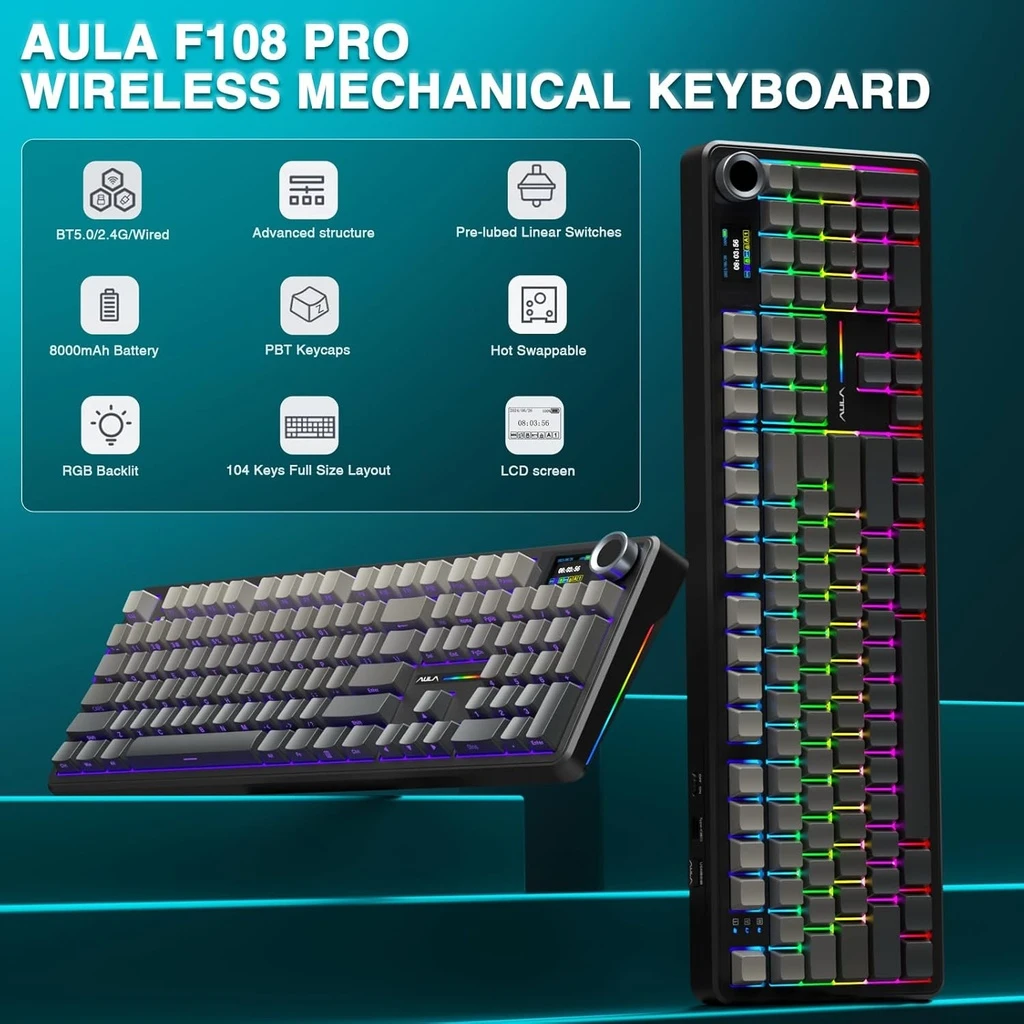
AULA F108 Pro is a full-size 108-key wireless mechanical keyboard with a 1.14-inch TFT smart display and multi-function knob. It features a gasket mount with five-layer sound dampening, hot-swappable 3/5-pin sockets, pre-lubed linear switches, PBT keycaps, and south-facing RGB. In addition, it includes an 8000mAh battery and tri-mode connectivity via Bluetooth 5.0, 2.4GHz wireless, and USB-C wired. Available at Alfrensia for 3,799 EGP.
⚡ Engineering Highlights at a Glance:
- 1.14″ TFT Smart Display: Shows connection mode, battery level, date/time, and volume. In addition, you can upload custom GIF images through the driver software [citation:8].
- Multi-Function Rotary Knob: Controls volume, connection mode switching, and screen navigation. The knob also works as a push-button for menu confirmation [citation:4].
- Tri-Mode Connectivity: Bluetooth 5.0, 2.4GHz wireless, and USB-C wired. The 2.4GHz and wired modes use a 1000Hz polling rate for responsive input [citation:1][citation:4].
- 8000mAh Battery: Large rechargeable battery delivers up to 76 hours of continuous use with the screen at full brightness [citation:1][citation:4].
- Gasket Mount with Five-Layer Dampening: PO sandwich foam, PO switch pad, PET sound-enhancement pad, PO bottom foam, and bottom silicone reduce cavity noise for a softer, quieter keystroke [citation:4].
- Hot-Swappable Sockets: Compatible with both 3-pin and 5-pin mechanical switches. The board ships with pre-lubed linear Reaper switches [citation:8].
- PBT Double-Shot Keycaps: Cherry profile keycaps resist shine and wear better than ABS alternatives [citation:4].
Full-Size Layout with Smart Controls
The F108 Pro uses a 100% full-size layout with 104 keys plus dedicated function and numeric zones [citation:4]. Because it retains the numpad and arrow keys, it suits data entry, programming, and productivity work. The 1.14-inch TFT display sits near the top-right corner. It displays keyboard status such as connection mode, battery level, and system mode. Using the AULA driver, you can replace the default screens with custom GIF images [citation:8]. The multi-function knob sits beside the display. By default, it controls volume. However, you can cycle through other functions by pressing and holding FN while pressing the knob [citation:4].
Tri-Mode Wireless and Multi-Device Support
The F108 Pro connects through three modes: Bluetooth 5.0, 2.4GHz wireless, and USB-C wired. Because Bluetooth mode supports up to three paired devices, you can switch between a desktop, laptop, or tablet without reconnecting cables [citation:1]. The 2.4GHz and wired modes use a 1000Hz polling rate, which reduces input delay compared to Bluetooth [citation:4]. The keyboard is compatible with Windows, Mac, iOS, and Android systems [citation:8]. You can switch systems using the knob or keyboard shortcuts [citation:6].
Typing Feel and Sound Design
The gasket mount isolates the PCB from the case using silicone gaskets. This design reduces vibration and produces a softer, more consistent keystroke compared to stiffer tray-mount keyboards. Five layers of internal foam absorb resonance and cavity noise. As a result, the typing sound is described as creamy and controlled rather than hollow or harsh [citation:4]. The board ships with pre-lubed linear Reaper switches. These switches have a 45gf trigger force and 1.8mm pre-travel, which provides a smooth keystroke without scratchiness [citation:4]. Because the sockets are hot-swappable, you can change to a different switch type without soldering [citation:8].
Who is the AULA F108 Pro For?
Expert Advice & Build Considerations
Driver Requires Windows and Wired Mode
Custom GIF uploads, macro programming, and date/time calibration require the AULA driver software. The driver only supports Windows systems and requires a wired USB-C connection [citation:8][citation:10]. Basic functions such as volume control, lighting mode cycling, and connection switching work without software.
2.4GHz Receiver Placement Affects Stability
AULA recommends connecting the 2.4GHz receiver to a USB 2.0 port away from other wireless receivers and metal hubs [citation:6]. If the connection feels unstable, re-pair the receiver by switching to 2.4G mode, holding FN + ~ for three seconds, then reinserting the receiver [citation:3].
📐 Charging and Battery Care
Use the included USB-C cable and connect to a computer for charging. Do not use fast-charging adapters, because they may cause irreversible damage to the keyboard’s charging circuit [citation:6]. To extend battery life, lower the backlight brightness or turn off lighting effects when running wirelessly.
المواصفات الفنية
| الموديل | AULA F108 Pro |
| العلامات التجارية | AULA |
| SKU / MPN | KB-07-13 |
| EAN | 6948391296753 |
| Layout | 100% Full Size (108 Keys) |
| Connectivity | Bluetooth 5.0 / 2.4GHz Wireless / USB-C Wired |
| Display | 1.14-inch TFT Smart Display |
| Knob | Multi-Function Rotary Knob |
| Switch Type | Pre-Lubed Linear (Reaper), 45gf |
| Hot-Swap | Yes, 3-pin / 5-pin compatible |
| Keycaps | PBT Double-Shot, Cherry Profile |
| Mount Type | Gasket Mount with 5-Layer Sound Dampening |
| Backlight | South-Facing Per-Key RGB |
| Battery | 8000mAh Rechargeable |
| Polling Rate | 1000Hz (Wired / 2.4GHz), 125Hz (Bluetooth) |
| Compatibility | Windows, macOS, iOS, Android |
| Included Accessories | Keyboard, USB-C Cable, 2.4GHz Receiver, Keycap/Switch Puller, User Manual |
Expert Recommendation: Getting the Most from Your F108 Pro
Before using the keyboard wirelessly, charge it fully using the included USB-C cable connected to a computer. Avoid fast-charging adapters, because they may damage the charging circuit [citation:6]. For gaming, switch to 2.4GHz mode with the included receiver for the lowest latency. Use Bluetooth mode for tablets and phones, where the 125Hz polling rate is sufficient and battery life is longer. To customize the TFT display with GIF images, connect via USB-C and use the AULA driver on a Windows system [citation:8]. The knob defaults to volume control; press FN + knob to cycle through lighting adjustment, language, and mode switching. If you plan to swap switches, the hot-swap sockets accept both 3-pin and 5-pin types. Because the keyboard is full-size, ensure your desk has enough room for the 44.5cm width. Use the two-stage kickstand to adjust the typing angle for comfort during long sessions [citation:5].
Frequently Asked Questions
How do I customize the TFT display on the F108 Pro?
Connect the keyboard via USB-C and use the AULA driver on a Windows system to upload custom GIF images or adjust the display settings. The driver also allows you to calibrate the date and time. Wireless modes do not support display customization [citation:8].
Can I use this keyboard with a Mac?
Yes. The F108 Pro supports Windows, macOS, iOS, and Android. You can switch systems using the knob menu or keyboard shortcuts. Note that the driver software only runs on Windows in wired mode [citation:8].
What switches does the F108 Pro use?
The keyboard ships with pre-lubed linear Reaper switches. These have a 45gf trigger force and 1.8mm pre-travel. Because the sockets are hot-swappable, you can replace them with any 3-pin or 5-pin mechanical switch [citation:4][citation:8].
How long does the 8000mAh battery last?
AULA claims up to 76 hours of continuous use with the screen at full brightness and backlighting on. Actual battery life varies depending on RGB brightness and connection mode. Bluetooth mode typically lasts longer than 2.4GHz mode [citation:1][citation:4].
Why is my 2.4GHz connection unstable?
Connect the 2.4GHz receiver to a USB 2.0 port away from other wireless receivers and metal hubs. If the issue persists, re-pair the receiver by switching to 2.4G mode, holding FN + ~ for three seconds, then reinserting the receiver [citation:3][citation:6].
| MODEL | |
|---|---|
| Connection | |
| Switch Type | |
| Mechanical Switch Type | |
| Keyboard Size | |
| Lighting | |
| Wrist rest | |
| Cable Length | |
| Software | |
| Color | |
| Part Number | |
| الضمان |
يسمح فقط للزبائن مسجلي الدخول الذين قاموا بشراء هذا المنتج ترك مراجعة.

المراجعات
لا توجد مراجعات بعد.