


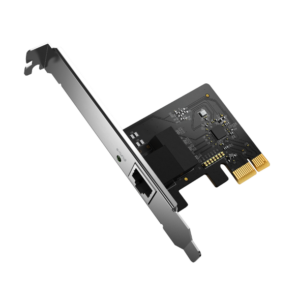


MERCUSYS MA210E Gigabit PCIe Network Adapter
499 جنيه
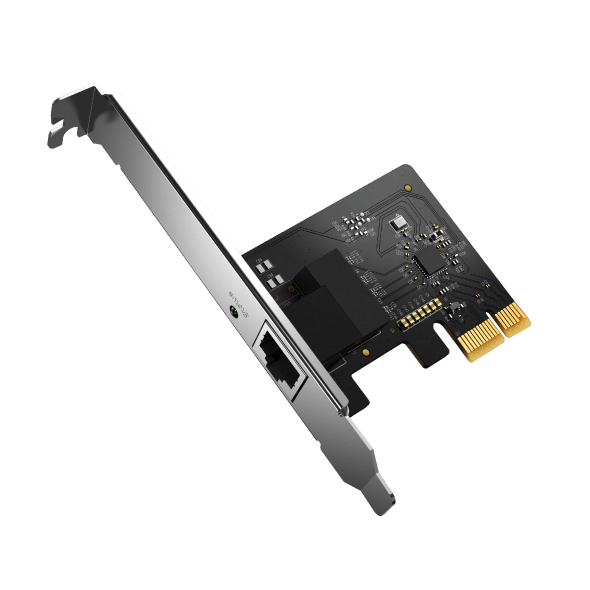
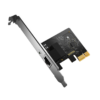
MERCUSYS MA210E is a Gigabit PCIe network adapter that adds a 10/100/1000Mbps RJ45 Ethernet port to a compatible desktop PC.
- 1 × PCI Express interface · 1 × RJ45 port
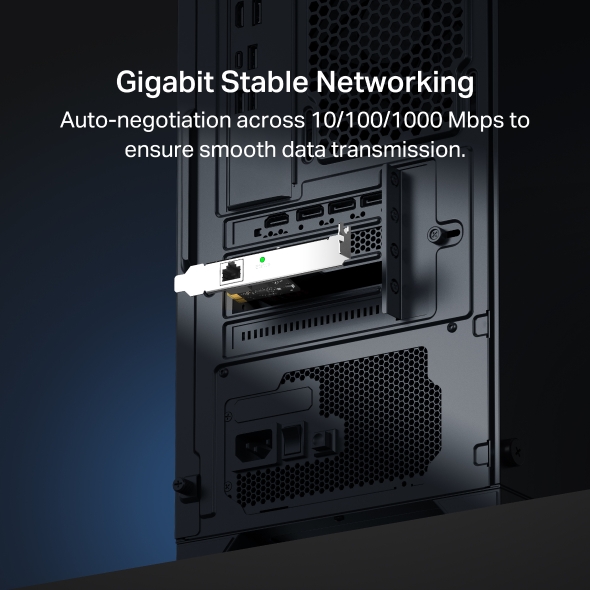
- 10/100/1000Mbps auto-negotiation
- Wake-on-LAN · Flow Control · Energy Efficient Ethernet
- Standard and low-profile brackets included
- Dimensions: 78.1 × 120.8 × 21.5mm · EAN: 6957939003258
المتوفر في المخزون 2 فقط
ضمان أفضل سعرMERCUSYS • WIRED NETWORKING
MERCUSYS MA210E Gigabit PCIe Network Adapter
Add a wired Gigabit Ethernet connection to a compatible desktop PC using one PCI Express slot and a single RJ45 port supporting 10/100/1000Mbps auto-negotiation.
Stable wired Gigabit networking
The MA210E adds a dedicated Ethernet interface for desktops that need a reliable wired connection to a router, switch, NAS or network server. Its RJ45 port negotiates 10Mbps, 100Mbps or 1Gbps link speeds according to the connected network equipment and cabling.
PCI Express installation and flexible brackets
The adapter connects through a PCI Express slot and includes both a standard-height bracket and a low-profile bracket. This gives builders a mounting option for compatible full-height and compact desktop cases. Check the available slot and case clearance before installation.
Useful network features
- Wake-on-LAN: supports remote wake signals when the motherboard, operating system and network configuration also support the feature.
- Flow Control: supports IEEE 802.3x flow control.
- Energy Efficient Ethernet: supports IEEE 802.3az power-saving functionality.
- Status LED: indicates network connection status.
Technical specifications
| Model Name | MERCUSYS MA210E |
|---|---|
| EAN-13 / GTIN | 6957939003258 |
| Product Type | Gigabit PCIe Network Adapter |
| Host Interface | 1 × PCI Express |
| Network Interface | 1 × RJ45 Ethernet port |
| Data Rates | 10 / 100 / 1000Mbps auto-negotiation |
| Network Standards | IEEE 802.3, 802.3x, 802.3az, 802.3i, 802.3u, 802.3ab |
| Network Media | 1000BASE-T / 100BASE-TX |
| Features | Wake-on-LAN, Flow Control, Energy Efficient Ethernet, status LED |
| Dimensions | 78.1 × 120.8 × 21.5mm |
| Supported Operating Systems | Windows 11 / 10 / 8.1 / 8 / 7, Windows XP and Windows Vista |
| Certifications | CE, RoHS |
What’s in the box?
- 1 × MERCUSYS MA210E Gigabit PCIe Network Adapter
- 1 × Standard-height bracket
- 1 × Low-profile bracket
- 1 × Quick Installation Guide
Compatibility notes
This is an internal PCIe adapter for desktop computers, not a USB Ethernet dongle. Confirm that your motherboard has an available compatible PCI Express slot and that the selected bracket fits your PC case. Actual network throughput depends on the router or switch, Ethernet cable, ISP service and network conditions. Wake-on-LAN also requires compatible motherboard and system settings.
Frequently asked questions
Does the MA210E support Gigabit Ethernet?
Yes. Its RJ45 port supports link speeds up to 1000Mbps, with 10Mbps and 100Mbps auto-negotiation as well.
Are low-profile brackets included?
Yes. The package contents list both a standard-height bracket and a low-profile bracket.
Can I install it in a laptop?
No. It is an internal PCI Express adapter intended for compatible desktop PCs.
Does Wake-on-LAN work automatically?
Wake-on-LAN requires support from the motherboard, operating system, BIOS/UEFI settings and network configuration in addition to the adapter.
Manufacturer support
For current driver downloads and compatibility notes, consult the official MERCUSYS MA210E support page.
| MODEL | |
|---|---|
| Network Connectivity | |
| Connectivity | |
| Platform | |
| Product Dimensions | |
| الضمان |
يسمح فقط للزبائن مسجلي الدخول الذين قاموا بشراء هذا المنتج ترك مراجعة.
الضمان وشروط الشراء
- مدة الضمان للمنتج ده: 2 Years (ضمان الوكيل). التفاصيل
- استبدال فوري بجديد: لو ظهر عيب صناعة في أي وقت خلال فترة الضمان، المنتج بيتغير بجديد من غير صيانة أو تصليح (ما عدا المنتجات اللي محتاجة شغل سوفت وير). ولو البديل مش متوفر، بنرجعلك المبلغ كامل من غير خصم. التفاصيل
- الاسترجاع: لو مش محتاج المنتج، تقدر ترجّعه خلال 30 يوم من تاريخ الشراء، بشرط يكون متبرشم ومتفتحش وبكل مشتملاته. التفاصيل
- فحص الشحنة: قبل ما تستلم، بص على التغليف الخارجي للشحنة. لو الكرتونة متبهدلة (مقطوعة أو مبلولة أو مضغوطة أو اللاصق مفتوح) وباين إن فيه تلف، ارفض الشحنة مع المندوب وكلمنا فورًا على 01021625421. ومتفتحش علبة المنتج قبل ما تستلم. التفاصيل
- بعد الاستلام: لو فتحت ولقيت تلف أو نقص جوه، كلمنا خلال 48 ساعة على 01021625421، واحتفظ بالكرتونة وصور أو فيديو الفتح. التفاصيل
- الضمان لا يشمل: سوء الاستخدام (حرق – كسر – خدش – إزالة ستيكر الضمان)، وأنظمة التشغيل والبرامج والإكسسوارات الـ Generic. التفاصيل
- مهم: حافظ على ستيكر ضمان المؤسسة الفرنسية وعلى كل مشتملات العلبة علشان تستفيد من ضمان الوكيل. التفاصيل
- الدفع والتوصيل: كاش عند الاستلام. القاهرة والجيزة والإسكندرية خلال 2–3 أيام عمل، وباقي المحافظات خلال 3–5 أيام عمل من تأكيد الطلب. التفاصيل
- رد المبلغ: فلوسك ترجعلك خلال يومين عمل من استلامنا للمنتج، على إنستاباي أو محفظتك أو حسابك البنكي. التفاصيل
- حقوقك القانونية: كل حقوقك بقانون حماية المستهلك رقم 181 لسنة 2018 محفوظة، والمميزات اللي فوق إضافة عليها. التفاصيل






المراجعات
لا توجد مراجعات بعد.