

Xbox PC App Redesign: Faster Launch, Better Library and What Gamers Get
Microsoft is refreshing the Xbox PC app and its cloud-gaming interfaces. The headline speed gains are based on Microsoft’s own tests, while the first PC preview is for Xbox Insiders.
What was announced
A faster Xbox experience is coming to PC, web and cloud
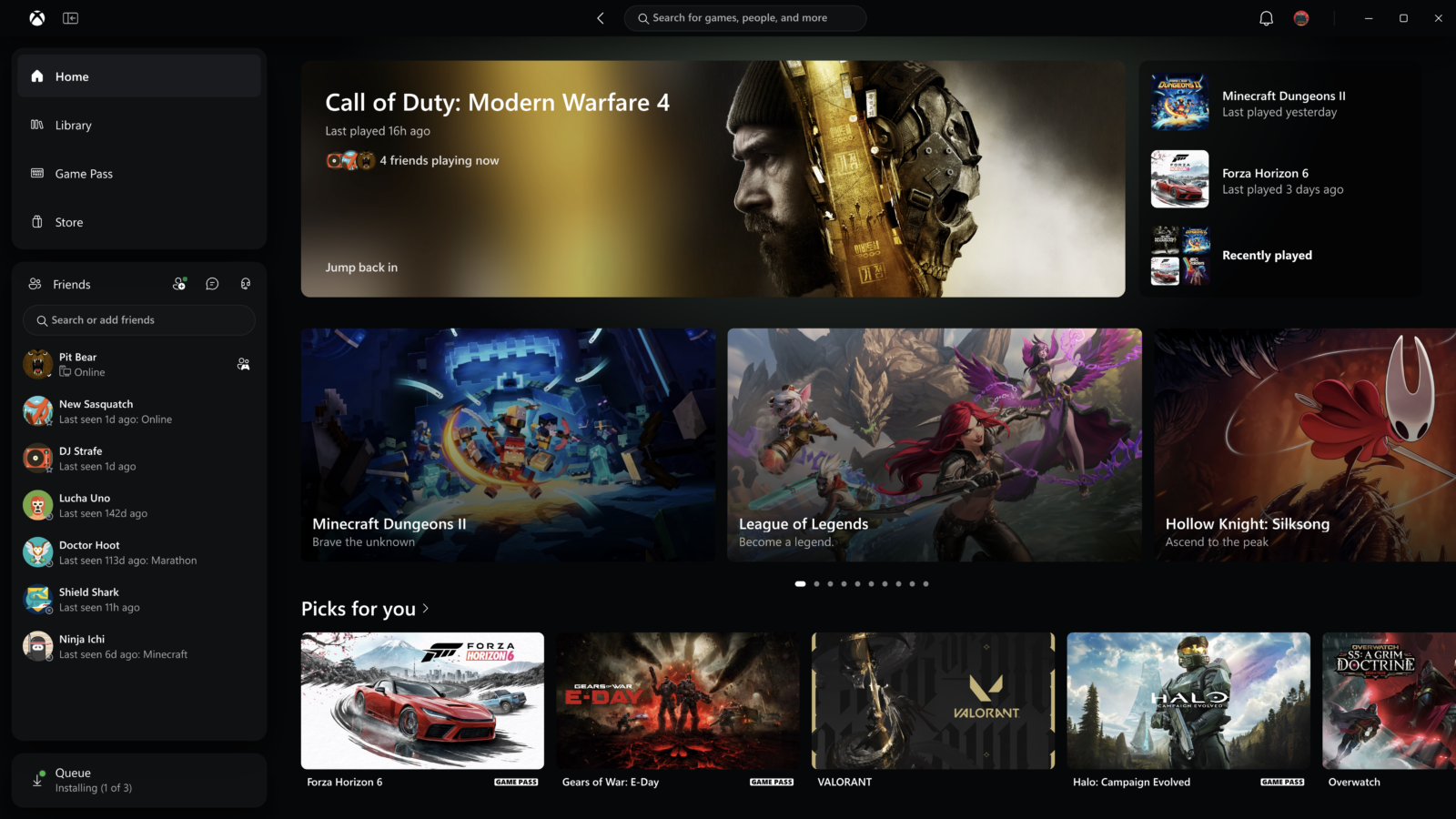
On November 5, Microsoft announced a redesigned Xbox PC app alongside changes to the Xbox Cloud Gaming web experience and apps for supported TVs and VR headsets. Xbox Insiders were invited to begin testing the updated PC app immediately.
The goal is straightforward: make it quicker to find games, organize a library, reach friends and move around the interface with a controller. This is a software and usability update—not a new graphics technology or a change to PC game requirements.
Performance claims
How much faster is the redesigned app?
Microsoft reports that the redesigned Xbox PC app launches up to 60% faster. The company also says key pages such as Home, Store and Game Pass load up to 50% faster, while in-app windows open up to 65% faster.
For players, the practical benefit is less waiting inside the launcher and a more responsive interface. It does not mean a game will render more frames per second or that a GPU will become faster.
The interface
What is changing inside the Xbox PC app?
A more organized library
Microsoft is simplifying navigation, updating filters and adding more ways to organize games. The aim is to make a large collection easier to browse and return to.
Friends closer to the home screen
Friends and social features move into the main navigation, making it easier to see what friends are playing, start a chat or join a party.
Search across more of Xbox
The updated search can return games, installed titles, add-ons and people from one place, reducing the need to jump between separate sections.
Refreshed cards and animations
Microsoft has refreshed game cards, Home, Settings and interface animations to make the app feel more consistent and easier to scan with a controller.
Cloud gaming
The web and supported-screen experience is changing too
Microsoft says the refreshed Xbox web experience will roll out to more players over the following weeks. A new Library tab brings together games that can be played through the cloud, whether they are owned or available through Game Pass.
The web interface also adds a desktop mode for larger screens, dark and light themes, and five high-contrast options. Microsoft is beginning to bring the refreshed look and navigation to Xbox cloud-gaming apps on supported TVs and VR headsets.
Cloud access still depends on the supported service, account, device, network and region. The announcement does not establish that every cloud feature or catalogue is available in Egypt, so users should check the current Xbox service information for their location.
Availability
Who can try it now?
Microsoft’s November 5 announcement says Xbox Insiders can test the updated PC app. It does not give a single global public-release date for every PC user. The web experience is planned to reach more players over the coming weeks, while TV and VR updates are limited to supported apps and devices.
That means the new interface may not appear on every account at the same time. A staged preview is normal for software updates: Microsoft can collect feedback, identify issues and adjust the experience before a broader rollout.
For PC gamers in Egypt
Does this change the PC hardware you need?
No hardware upgrade is required simply to benefit from a launcher redesign. The reported improvements relate to app responsiveness and navigation, not in-game rendering performance.
- FPS: A faster launcher does not increase a game’s frame rate. GPU, CPU, memory, game settings and drivers still determine local rendering performance.
- Controllers: The simplified navigation should make the app more convenient for players who prefer using a controller from the sofa or desk.
- Cloud gaming: Streaming quality depends on network stability and whether the relevant cloud service is supported in your region. Do not assume a feature is locally available just because it appears in a global announcement.
- Game planning: Check each game’s own storage and hardware requirements. Our Modern Warfare 4 PC requirements guide is an example of how to assess a title before upgrading.
For Windows performance context, see our Windows 11 and 8GB RAM guide. It covers operating-system memory behaviour, a separate topic from Xbox app launch speed.
Common questions
Xbox PC app redesign FAQs
Is the redesigned Xbox PC app available to everyone?
Not yet according to the November 5 announcement. Xbox Insiders were invited to test the PC app first. Microsoft has not provided one public-release date covering every PC user.
Does the app really launch 60% faster?
Microsoft reports up to 60% faster launch times in its own testing. The company says results may vary by device, connection, system configuration and usage.
Will the redesign increase FPS in games?
No. The announcement concerns app launch, navigation, library organization and cloud interfaces. It does not claim to increase in-game FPS or GPU performance.
Is the new Xbox Cloud Gaming web interface available in Egypt?
The announcement describes a broader rollout but does not confirm availability of every cloud feature in Egypt. Check the current Xbox service and regional support information before relying on cloud access.
Do I need a new controller or graphics card?
No. The redesign is a software update. Existing supported controllers and PCs can use the app according to Microsoft’s current compatibility and rollout requirements.
Sources
Official announcement and further reading
Build a PC around the games you actually play
Compare components, display requirements and compatibility before planning an upgrade.
Explore Alfrensia.comتحديث تطبيق Xbox للكمبيوتر: فتح أسرع ومكتبة ألعاب أسهل وإيه اللي هيتغير للجيمرز؟
مايكروسوفت بتجهز واجهة جديدة لتطبيق Xbox على الكمبيوتر وتجربة اللعب السحابي على الويب. أرقام السرعة مبنية على اختبارات الشركة، وأول معاينة على الكمبيوتر مخصصة لأعضاء Xbox Insiders.
إيه اللي اتعلن؟
تجربة Xbox أسرع وأسهل جاية للكمبيوتر والويب والـCloud
يوم 5 نوفمبر، مايكروسوفت أعلنت عن إعادة تصميم تطبيق Xbox للكمبيوتر، بالتوازي مع تحديث تجربة Xbox Cloud Gaming على الويب والتطبيقات الموجودة على بعض الشاشات الذكية ونظارات الواقع الافتراضي المدعومة. ومن نفس اليوم، أعضاء Xbox Insiders قدروا يبدأوا تجربة نسخة الكمبيوتر الجديدة.
الهدف هو تسهيل الوصول للألعاب وتنظيم المكتبة ومتابعة الأصدقاء والتنقل داخل التطبيق باستخدام يد التحكم. ده تحديث للبرنامج وتجربة الاستخدام، مش تقنية رسومية جديدة ولا تغيير في متطلبات تشغيل الألعاب.
أرقام الأداء
التطبيق بقى أسرع قد إيه؟
مايكروسوفت بتقول إن فتح تطبيق Xbox بقى أسرع بنسبة تصل إلى 60%. والشركة بتذكر كمان إن صفحات زي Home وStore وGame Pass بتتحمل أسرع بنسبة تصل إلى 50%، وإن النوافذ الداخلية بتفتح أسرع بنسبة تصل إلى 65%.
الفايدة العملية للجيمر هي انتظار أقل داخل التطبيق وتنقل أسرع بين الأقسام. لكن ده مش معناه زيادة FPS داخل اللعبة أو إن كارت الشاشة نفسه بقى أقوى.
تجربة الاستخدام
إيه اللي اتغير جوه تطبيق Xbox للكمبيوتر؟
مكتبة ألعاب أسهل في التنظيم
مايكروسوفت بتبسط التنقل وبتحدث الفلاتر وبتضيف طرق أكتر لتنظيم الألعاب، علشان الوصول لمكتبة كبيرة يبقى أسهل.
الأصدقاء أقرب للواجهة الرئيسية
قائمة الأصدقاء والخصائص الاجتماعية بقت جزء من التنقل الأساسي، علشان تشوف أصحابك بيلعبوا إيه وتبدأ محادثة أو تنضم لمجموعة بسهولة.
بحث أوسع داخل Xbox
البحث الجديد يقدر يعرض ألعاب وعناوين مثبتة وإضافات وأشخاص من مكان واحد، بدل التنقل بين أقسام منفصلة.
تصميم وحركة محدثة
الشركة حدثت بطاقات الألعاب والصفحة الرئيسية والإعدادات والأنيميشن علشان الواجهة تبقى أوضح وأسهل في الاستخدام بيد التحكم.
اللعب السحابي
تجربة الويب والشاشات المدعومة بتتغير هي كمان
مايكروسوفت بتقول إن تجربة Xbox على الويب هتبدأ توصل لمستخدمين أكتر خلال الأسابيع التالية للإعلان. وفيه تبويب Library جديد بيجمع الألعاب اللي تقدر تلعبها من خلال السحابة، سواء ألعاب مملوكة لحسابك أو متاحة من خلال Game Pass.
واجهة الويب كمان بتضيف وضع Desktop علشان تستغل الشاشات الكبيرة، واختيار الوضع الفاتح أو الداكن، وخمس اختيارات تباين مرتفع لسهولة القراءة. والشركة بدأت كمان تنقل التصميم والتنقل الجديدين لتطبيقات Xbox Cloud Gaming على بعض أجهزة التلفزيون ونظارات VR المدعومة.
الوصول للـCloud بيعتمد على الخدمة والحساب والجهاز والشبكة والمنطقة. الإعلان مش دليل إن كل خصائص اللعب السحابي أو كل مكتبة الألعاب متاحة في مصر، فراجع التوافر الإقليمي الحالي قبل ما تعتمد على الخدمة.
التوافر
مين يقدر يجرب التحديث دلوقتي؟
إعلان مايكروسوفت يوم 5 نوفمبر بيقول إن أعضاء Xbox Insiders يقدروا يجربوا تطبيق الكمبيوتر الجديد. لكن الشركة ما أعلنتش عن تاريخ إطلاق عام واحد لكل مستخدمي الكمبيوتر. تجربة الويب هتتوسع لمستخدمين أكتر خلال الأسابيع التالية، أما تطبيقات التلفزيون والـVR فهي مرتبطة بالأجهزة المدعومة.
ده معناه إن الواجهة الجديدة مش لازم تظهر لكل الحسابات في نفس الوقت. التوزيع التجريبي بيسمح لمايكروسوفت تجمع الملاحظات وتكتشف المشاكل وتعدل التجربة قبل التوسع.
بالنسبة لجيمرز مصر
هل التحديث ده يغير مواصفات الكمبيوتر اللي محتاجها؟
لأ، مش محتاج ترقية هاردوير لمجرد الاستفادة من إعادة تصميم التطبيق. التحسينات المعلنة مرتبطة بسرعة فتح البرنامج والتنقل، مش بأداء الرسوميات داخل الألعاب.
- الفريمات: فتح التطبيق بسرعة مش هيزود FPS اللعبة. المعالج وكارت الشاشة والرامات والإعدادات والتعريفات لسه هي اللي بتحدد أداء اللعبة محلياً.
- يد التحكم: التنقل الأبسط ممكن يخلي التطبيق أريح للي بيفضلوا استخدام Controller من الكنبة أو المكتب.
- اللعب السحابي: جودة البث بتعتمد على استقرار الشبكة وعلى توافر الخدمة في منطقتك. متفترضش إن كل ميزة موجودة محلياً لمجرد إنها ظهرت في إعلان عالمي.
- تجهيز الجهاز: راجع متطلبات كل لعبة بشكل منفصل. دليلنا عن متطلبات Modern Warfare 4 للكمبيوتر مثال على إزاي تراجع جهازك قبل الترقية.
ولو مهتم بأداء Windows واستهلاك الذاكرة، شوف دليلنا عن تحسينات Windows 11 مع 8GB RAM. ده موضوع منفصل عن سرعة فتح تطبيق Xbox.
أسئلة شائعة
أسئلة عن تحديث تطبيق Xbox للكمبيوتر
هل تطبيق Xbox الجديد متاح لكل المستخدمين؟
لأ، حسب إعلان 5 نوفمبر. أعضاء Xbox Insiders بدأوا تجربة تطبيق الكمبيوتر الأول، ومايكروسوفت ما أعلنتش عن موعد عام واحد لكل المستخدمين.
هل التطبيق فعلاً أسرع بنسبة 60%؟
مايكروسوفت بتقول إن فتح التطبيق أسرع بنسبة تصل إلى 60% في اختبارات الشركة. والنتائج ممكن تختلف حسب الجهاز والاتصال وتكوين النظام وطريقة الاستخدام.
هل التحديث هيزود FPS داخل الألعاب؟
لأ. الإعلان عن سرعة فتح التطبيق والتنقل وتنظيم المكتبة وتجربة الـCloud، ومفيهوش ادعاء بزيادة FPS أو أداء كارت الشاشة داخل الألعاب.
هل تجربة Xbox Cloud Gaming الجديدة متاحة في مصر؟
الإعلان بيتكلم عن توسيع التوزيع، لكنه مش بيأكد توافر كل خصائص اللعب السحابي في مصر. راجع دعم الخدمة والتوافر الإقليمي قبل الاعتماد عليها.
هل محتاج أشتري Controller أو كارت شاشة جديد؟
لأ. ده تحديث برمجي. الأجهزة ووسائل التحكم المدعومة حالياً تقدر تستخدم التطبيق حسب شروط التوافق والتوزيع من مايكروسوفت.
المصادر
الإعلان الرسمي ومراجع إضافية
جهّز الكمبيوتر حسب الألعاب اللي بتلعبها فعلاً
قارن المكونات ومتطلبات الشاشة والتوافق قبل ما تخطط لأي ترقية.
تصفح alfrensia.com