


CPU and Motherboard Compatibility: What to Check Before Buyingتوافق المعالج واللوحة الأم: إيه اللي تراجعه قبل الشراء
ALFRENSIA PC COMPATIBILITY GUIDE · 8 MIN READ
CPU and motherboard compatibility requires more than matching a socket name. Verify the exact processor support list, BIOS version, memory generation, power delivery and the features you need before buying or assembling the system.
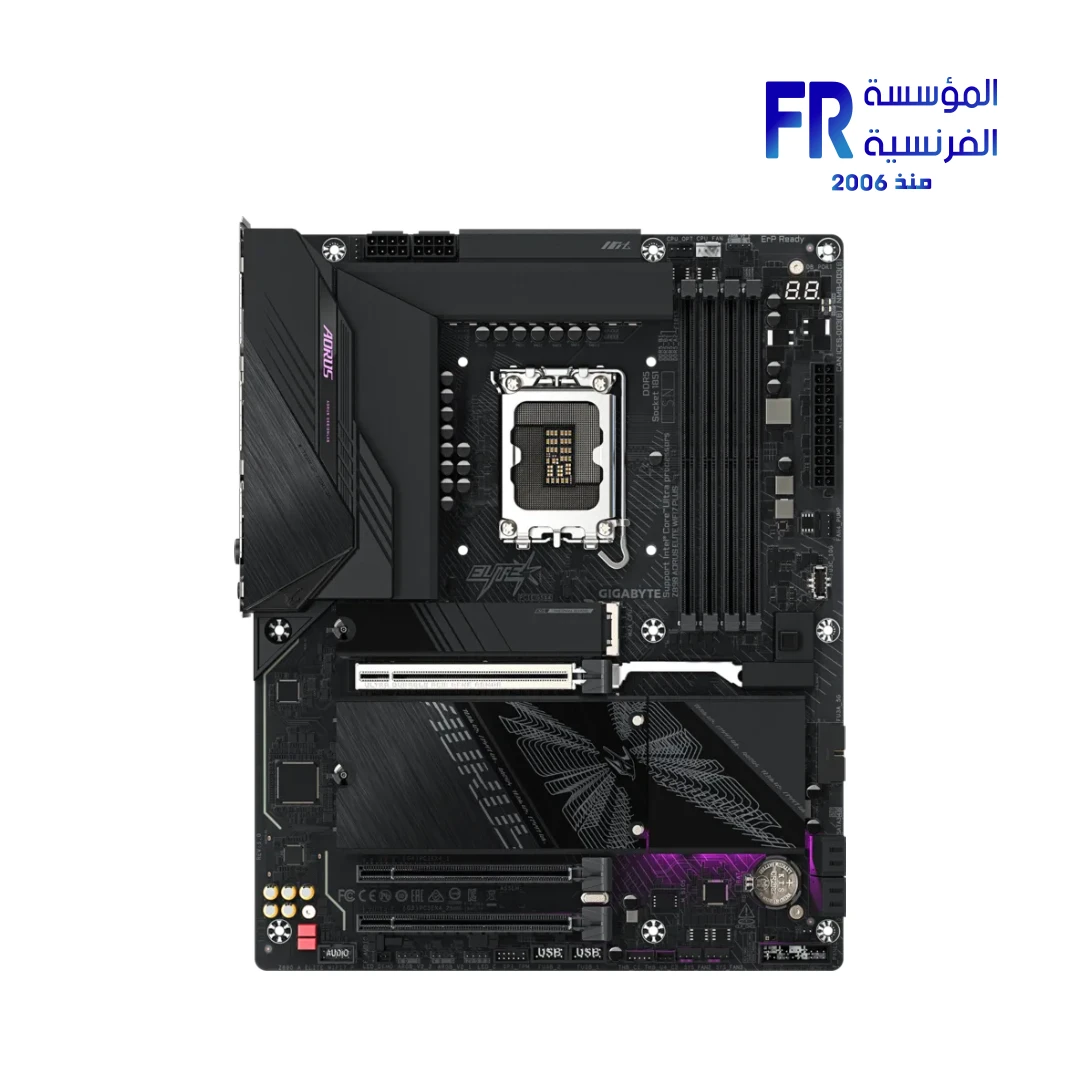
1. Check the CPU socket
The socket is the physical and electrical interface between the processor and motherboard. CPUs designed for different sockets generally cannot be installed interchangeably, even if the products are from the same manufacturer or family.
For example, Intel Core desktop processors from the 12th, 13th, and 14th generations use LGA1700, while Intel Core Ultra desktop processors (Series 2) use LGA1851. Intel states that LGA1851 processors are not backward-compatible with LGA1700 motherboards. Always identify the exact processor family before selecting a board.
Official references: Intel LGA1851 and LGA1700 socket incompatibility and Intel 12th–14th Gen Core desktop compatibility.
2. Verify the motherboard chipset and CPU support list
Even when the socket matches, not every processor is supported by every motherboard using that socket. Chipset generation, board design, power delivery, firmware, and manufacturer validation can affect support.
Open the support page for the exact motherboard model and revision. Find its CPU support list and confirm the processor appears there. If the manufacturer lists a minimum BIOS version, compare it with the board’s installed BIOS before planning the upgrade.
Do not rely on a retailer’s category filter, a generic chipset chart, or a similar-looking motherboard model as final confirmation.
3. Check the BIOS version before assembly
A motherboard can be physically compatible with a CPU but fail to boot if the installed BIOS does not support it. This is especially important when pairing an older board with a newer processor.
AMD’s guidance explains that a BIOS update may be required to support a newer Ryzen desktop CPU, and the update instructions should come from the motherboard manufacturer. Check whether the board supports updating BIOS without a compatible CPU (often called USB BIOS Flashback or a similar feature). Do not assume every model offers this capability.
Official reference: AMD — BIOS updates for Ryzen desktop systems.
4. Confirm memory generation and capacity
Motherboards support particular memory generations and configurations. DDR4 and DDR5 are physically and electrically different and are not interchangeable in a DIMM slot. A board designed for one memory type cannot be converted to the other simply by choosing a different kit.
Check the motherboard specification for supported memory type, number of slots, maximum capacity, and supported speeds. If you plan to enable a memory profile such as XMP or EXPO, verify the board, processor, and memory kit support the intended configuration. Advertised overclocked memory speeds can depend on the CPU’s memory controller, BIOS, and number of installed modules.
5. Consider CPU power delivery and cooling
Not every motherboard is equally suited to every high-power processor or sustained workload. Compare the board’s power-delivery design and the manufacturer’s CPU support notes, especially for processors with higher power demands. Also verify that your cooler is compatible with the socket and can handle the processor’s thermal requirements.
Check the motherboard’s CPU power connectors and ensure the PSU has the correct cables. Do not assume that a board’s socket alone means every supported CPU will run optimally under all workloads.
6. Check the features you actually need
Once CPU support is confirmed, compare the board’s connectivity and expansion features:
- Graphics and expansion slots: check slot layout, lane configuration, and clearance for the graphics card.
- Storage: confirm the number and type of M.2 and SATA connections and whether using one slot disables another port.
- USB and networking: verify the required USB speeds, Wi-Fi, Bluetooth, and Ethernet features on the exact model.
- Form factor: confirm ATX, Micro-ATX, or Mini-ITX compatibility with the case and available expansion slots.
- Rear I/O and headers: check the ports and internal headers required by your case and devices.
For example, the Gigabyte Z890 A Elite WiFi7 P motherboard uses Intel’s LGA1851 platform and DDR5 memory. That example does not establish compatibility with every Intel processor; check the exact CPU support list and BIOS requirements.
Examples: AMD AM4, AMD AM5, and Intel desktop platforms
AMD AM4
AM4 includes several Ryzen generations, but support depends on the chipset, exact board, and BIOS. AMD’s compatibility information shows that support differs across chipsets; some combinations may require a particular BIOS update. Do not assume every AM4 board supports every AM4 CPU.
Reference: AMD AM4 chipset and processor compatibility.
AMD AM5
AMD’s current AM5 information covers Ryzen 7000, 8000, and 9000 desktop processor families across supported AM5 chipsets. AMD notes that a BIOS update may be required for Ryzen 8000 and 9000 processors on some 600-series boards. Confirm the exact CPU and board combination with the manufacturer’s support list.
Reference: AMD AM5 chipset and CPU compatibility.
Intel LGA1700 and LGA1851
Intel’s 12th, 13th, and 14th Gen Core desktop processors use LGA1700 with supported Intel 600- or 700-series chipset boards. Intel Core Ultra desktop processors (Series 2) use LGA1851 and Intel 800-series chipsets, and are not compatible with older LGA1700 boards. Confirm exact model support and firmware requirements before purchase.
References: Intel Core 12th–14th Gen compatibility and Intel LGA1851 compatibility guidance.
Pre-purchase compatibility checklist
- Write down the full CPU model number.
- Identify the exact motherboard model and hardware revision.
- Confirm the CPU socket matches.
- Find the CPU on the motherboard manufacturer’s official support list.
- Check the minimum BIOS version and the board’s current firmware where possible.
- Confirm memory generation, capacity, and intended configuration.
- Check CPU power connectors, cooling compatibility, and case clearance.
- Verify storage, expansion, networking, and I/O features.
- Consider whether the total platform cost is better than an alternative CPU-and-board combination.
Frequently asked questions
If the socket matches, will the CPU work?
Not necessarily. Chipset support, BIOS version, motherboard design, and the manufacturer’s CPU support list must also be checked.
Can I install a new CPU without updating BIOS?
Only if the current BIOS already supports that CPU. Check the board’s support list and installed firmware first.
Can a DDR5 motherboard use DDR4 RAM?
No. Choose memory that matches the motherboard’s supported memory generation.
Can an AM4 CPU go into an AM5 motherboard?
No. AM4 and AM5 are different CPU platforms. Select the processor and motherboard from a compatible platform family.
Official sources
- AMD — AM4 chipset compatibility
- AMD — AM5 chipset compatibility
- AMD — BIOS update guidance
- Intel — Core desktop processor compatibility
- Intel — LGA1851 and LGA1700 incompatibility
Compatibility depends on the exact CPU, motherboard model and revision, and firmware. Always verify the manufacturer’s support list before ordering.
دليل توافق المعالج واللوحة الأم
توافق CPU وMotherboard مش مجرد تطابق اسم الـsocket. لازم تراجع دعم المعالج المحدد وإصدار BIOS والرام والطاقة والتبريد والمزايا اللي محتاجها.
1. افحص Socket المعالج
لازم المعالج واللوحة الأم يستخدموا socket متوافقاً فعلياً. تشابه الاسم أو الشركة المصنعة مش كفاية.
2. راجع Chipset وقائمة المعالجات المدعومة
افتح صفحة الدعم الرسمية لموديل اللوحة بالضبط، وتأكد إن المعالج موجود في CPU support list.
3. راجع BIOS قبل التجميع
بعض المعالجات تحتاج إصدار BIOS أحدث. تأكد من الإصدار المطلوب وطريقة التحديث المدعومة قبل تركيب المعالج.
4. تأكد من جيل الرام والسعة
اللوحة المصممة لـDDR4 لا تقبل DDR5 والعكس. راجع السعة القصوى والسرعات المدعومة وتكوين الذاكرة.
5. راجع الطاقة والتبريد
تحقق من قدرة دوائر الطاقة وتوصيلات EPS وتوافق المبرد مع المعالج والكيسة، خصوصاً مع المعالجات الأعلى استهلاكاً للطاقة.
6. راجع المزايا المطلوبة
راجع عدد منافذ M.2 وUSB وPCIe وWi-Fi والصوت ومنافذ الشاشة حسب احتياجك.
أمثلة على المنصات
AMD AM4
تحقق من دعم المعالج المحدد وإصدار BIOS؛ مش كل لوحات AM4 تدعم كل المعالجات بنفس الطريقة.
AMD AM5
راجع قائمة دعم المعالج والرام المتوافقة ومواصفات اللوحة المحددة.
Intel LGA1700 وLGA1851
الـsocket والمنصة مختلفان؛ تحقق من توافق المعالج واللوحة قبل الطلب ولا تعتمد على اسم Intel وحده.
قائمة التحقق قبل الشراء
- اسم موديل اللوحة بالضبط.
- قائمة المعالجات المدعومة.
- إصدار BIOS المطلوب.
- نوع الرام وسعتها.
- الطاقة والتبريد.
- المنافذ والمزايا المطلوبة.
الأسئلة الشائعة
لو الـsocket متطابق، هل المعالج هيشتغل؟
مش بالضرورة؛ راجع قائمة الدعم وإصدار BIOS ومتطلبات الطاقة للوحة المحددة.
هل أقدر أركب معالج جديد من غير تحديث BIOS؟
فقط لو إصدار BIOS الحالي بيدعم المعالج. راجع صفحة الدعم، ولو التحديث مطلوب شوف هل اللوحة بتدعم تحديث BIOS من غير CPU متوافق.
هل لوحة DDR5 تقبل DDR4؟
لأ. لازم تستخدم جيل الذاكرة اللي اللوحة مصممة له.
هل معالج AM4 يركب على لوحة AM5؟
لأ، AM4 وAM5 منصتان مختلفتان. اختار المعالج واللوحة من منصة متوافقة.
المصادر الرسمية
- AMD — توافق منصة AM4
- AMD — توافق منصة AM5
- AMD — إرشادات تحديث BIOS
- Intel — توافق معالجات Core المكتبية
- Intel — اختلاف LGA1700 وLGA1851
التوافق بيعتمد على موديل المعالج واللوحة وإصدار BIOS. راجع قائمة الدعم الرسمية قبل الشراء.
قبل ما تطلب القطع
جهّز رقم موديل المعالج واللوحة الأم والرام اللي ناوي عليها، وراجع توافقهم من صفحات الشركات المصنعة. لو محتاج مساعدة في اختيار القطع، تواصل مع المؤسسة الفرنسية للكمبيوتر.
قارن اللوحات الأم المتاحة في مصر والمعالجات المتاحة في مصر، وراجع أدلة شراء اللوحات الأم على موقع المؤسسة الفرنسية للكمبيوتر، أو تواصل مع المبيعات على واتساب للاستفسار عن توافق المعالج واللوحة والـBIOS.