

Gaming mouse specifications can look like a race to the biggest number, but DPI and polling rate describe different things. DPI affects how far the pointer moves for a given physical movement, while polling rate describes how often the mouse reports data to the computer. Neither number alone tells you whether a mouse will feel accurate or comfortable.
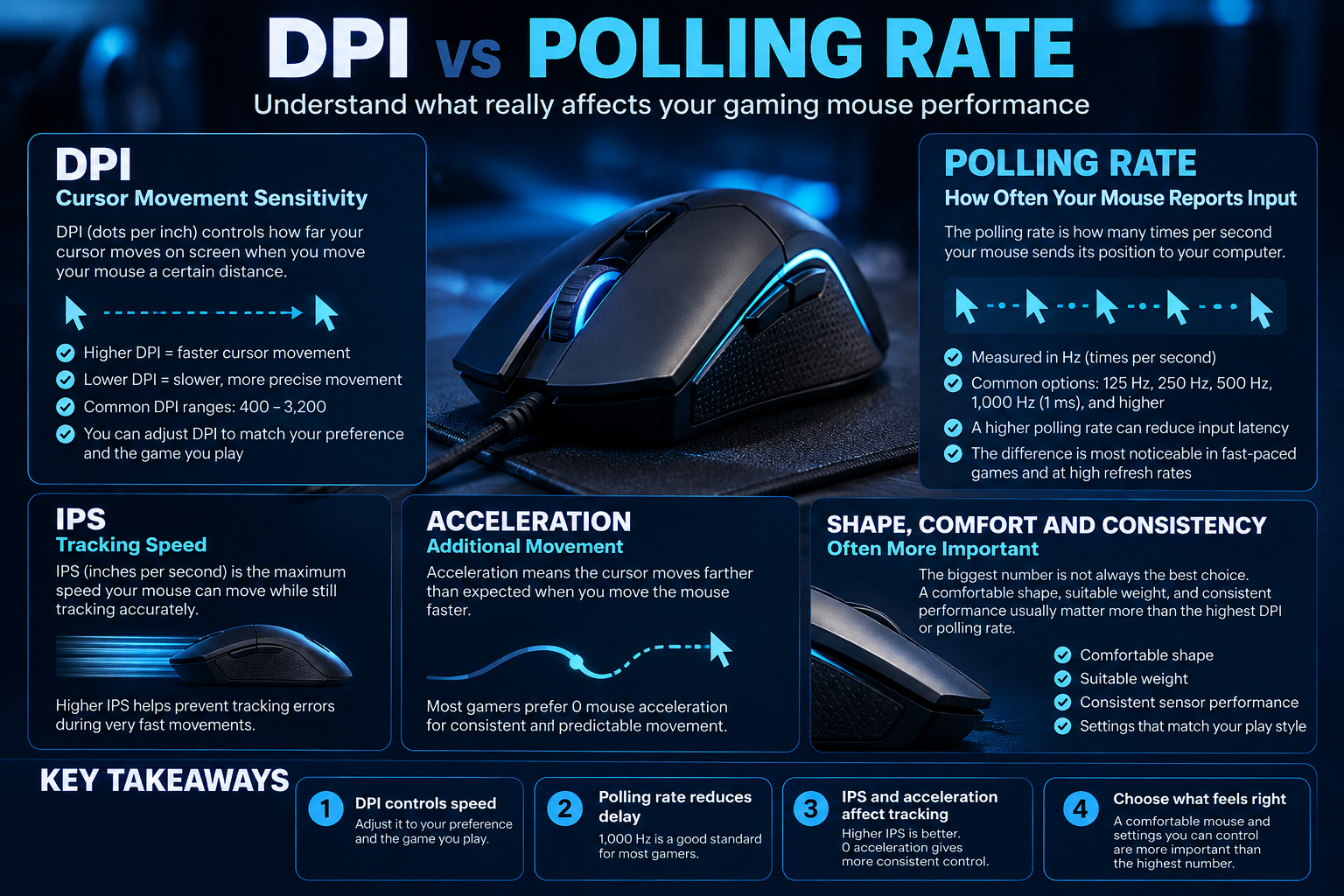
1. DPI: pointer sensitivity, not a quality score
DPI (dots per inch) is the common marketing term for mouse sensor resolution; CPI (counts per inch) is also used technically. A higher setting means the pointer can travel farther on screen for the same physical mouse movement. Very high maximum DPI is not automatically useful if you prefer lower sensitivity or if the setting makes precise control harder.
Many players choose a moderate DPI and adjust in-game sensitivity to reach a comfortable response. The best setting depends on the game, screen resolution, available desk space and personal preference. Consistency matters more than copying a professional player’s number without considering their setup.
2. Polling rate: how often the mouse reports
Polling rate is the frequency at which a mouse reports movement and button information to the computer, often expressed in hertz (Hz). For example, 1,000Hz represents a nominal report interval of about one millisecond. Higher rates can reduce the interval between reports, but the practical benefit depends on the game, system, mouse implementation and display frame rate.
Very high polling modes may increase system workload or affect battery life on wireless models. Check support in the mouse software and test whether a higher rate actually improves the experience on your PC.
3. IPS and acceleration
IPS (inches per second) describes the speed a sensor can track while maintaining its specified tracking performance. Acceleration ratings describe how much acceleration the sensor is designed to handle. These figures can help compare sensor capabilities, but they do not replace testing for consistent tracking, lift-off behaviour and performance on your mousepad.
4. Shape, weight and grip often matter more
A mouse can have impressive sensor numbers and still feel wrong in your hand. Consider palm, claw or fingertip grip; hand size; mouse shape; weight; button placement; cable drag or wireless receiver placement; and whether the mouse glides comfortably on your surface. If possible, try the shape before committing to it.
5. Set up the mouse methodically
- Choose a DPI that allows controlled movement across your normal mousepad space.
- Adjust in-game sensitivity gradually instead of changing multiple settings at once.
- Keep pointer acceleration settings consistent while evaluating changes.
- Test the same game and sensitivity for several sessions before deciding whether a change helps.
- Only increase polling rate if your mouse supports it and the system remains stable.
For a real product example, the Meetion Air GW40 Pro gaming mouse listing identifies its sensor and connection modes. Verify the exact current product specification rather than assuming every model in the series shares the same sensor.
Gaming mouse buying checklist
- Comfortable shape and weight for your hand and grip.
- Reliable sensor behaviour on your intended surface.
- DPI range and adjustment method that suit your settings.
- Polling rate supported by the mouse and software.
- Wired, 2.4GHz or Bluetooth mode appropriate to your setup.
- Button layout, scroll wheel, battery and warranty details.
Frequently asked questions
Is 30,000 DPI better than 8,000 DPI?
Not automatically. Maximum DPI is a capability, not a direct measurement of aim quality or sensor consistency.
Does 8,000Hz polling always feel better than 1,000Hz?
No. The benefit depends on the game, system and implementation; higher polling can also increase power use or system workload.
What matters most when choosing a gaming mouse?
Start with shape, comfort, reliable tracking and suitable connectivity. Then compare sensor specifications and controls.
Sources
Next step: Prioritise the mouse shape and consistent tracking first, then tune DPI and polling rate to a comfortable setup.
Compare options before you buy
Check the exact model, compatibility, current availability and warranty terms.
alfrensia.com — Alfrensia, French Establishment for Computers
يعني إيه DPI وPolling Rate؟
DPI أو CPI بيعبّر عن حساسية حركة الماوس، بينما Polling Rate هو عدد مرات إرسال الماوس لتحديثاته للجهاز في الثانية. الاتنين مختلفين ومش مقياس واحد للأداء.
اختار DPI المناسب
الحساسية المناسبة شخصية وبتعتمد على مساحة الماوس وطريقة اللعب وإعدادات اللعبة. رقم أعلى مش معناه تصويب أدق تلقائياً؛ الأهم التحكم والثبات والإعداد اللي تقدر تستخدمه باستمرار.
Polling Rate: هل الأعلى أفضل دائماً؟
معدل أعلى ممكن يقلل الفاصل بين التحديثات، لكن الفائدة العملية بتختلف حسب الجهاز واللعبة ومعدل الإطارات وحركة الماوس. ممكن كمان يزيد استهلاك الطاقة في بعض الماوسات اللاسلكية.
نصائح عملية
- ابدأ بإعداد حساسية مريح وثابت بدل تغيير DPI باستمرار.
- قارن الإحساس داخل اللعبة نفسها وبنفس إعدادات النظام.
- اتأكد إن اللعبة والنظام بيدعموا معدل Polling اللي اخترته.
- في الماوس اللاسلكي، راقب البطارية وثبات الاتصال.
- راجع شكل الماوس ووزنه ومكان الأزرار وجودة المستشعر.
الأسئلة الشائعة
هل 16000 DPI أدق من 800 DPI؟
مش بالضرورة؛ الرقم الأعلى بيدي نطاق حساسية أوسع، لكنه مش ضمان لتحكم أفضل.
هل 8000Hz ضروري للألعاب؟
مش لمعظم المستخدمين. قيم الفائدة الفعلية والتوافق وموارد الجهاز قبل دفع فرق السعر.
هل لازم أغير Windows pointer speed؟
اختار إعداداً ثابتاً ومناسباً لك، وتجنب تغيير عوامل كثيرة مرة واحدة أثناء ضبط الحساسية.
قارن قبل الشراء
مصادر إضافية
- Logitech: What is DPI? لشرح معنى DPI في الفأرات.
- Razer HyperPolling لمعلومات الشركة عن معدلات polling العالية.
راجع مواصفات الموديل والتوافق والضمان والسعر الحالي. للاستفسار عن الفأرات المتاحة واحتياجك الفعلي، تواصل مع المبيعات على واتساب أو زر موقع المؤسسة الفرنسية للكمبيوتر.