


The right SSD capacity depends on what you install and how you work. A drive that seems large when empty can fill quickly once you add Windows, applications, several large games, video footage, project caches and downloads. Instead of choosing by a universal “GB per user” rule, estimate your actual storage needs and leave room for growth.
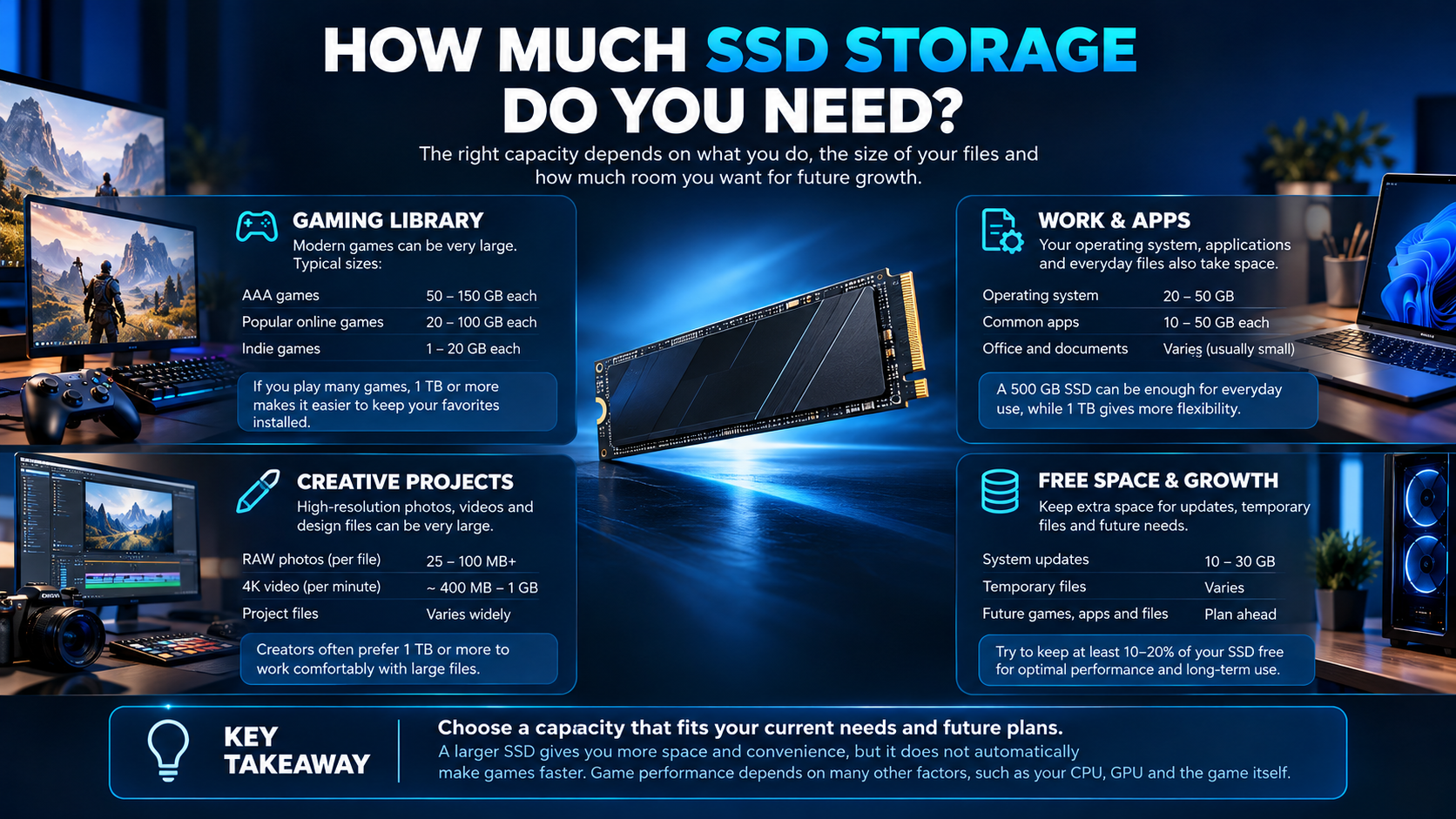
What uses storage space?
Start with the operating system and core applications, then estimate installed games, creative software, downloads, recorded gameplay, photos, video footage, virtual machines and active project files. Games and creative applications vary widely in size, so use the current installation size for the titles and tools you actually use rather than relying on a generic average.
Think in terms of workload, not a universal tier
| Typical use | What to estimate |
|---|---|
| Everyday PC | Operating system, browser, office apps, photos and downloads |
| Gaming | Number of installed games, launchers, updates and recorded clips |
| Student or developer | Development tools, source projects, datasets and virtual machines |
| Photo and video work | Original footage, cache, proxies, exports and archived projects |
| 3D and design | Asset libraries, source files, render output and project versions |
Use the table as a planning framework rather than a promise that one capacity fits everyone. Two gamers can have very different needs depending on the size of their installed library, while a video editor may need substantial space for footage even when the operating system and applications are modest.
Plan for usable space and growth
The advertised capacity and the space shown by the operating system will not be identical because capacity is represented and formatted differently. Also leave room for temporary files, application caches, game updates and the next project. Avoid planning to keep the drive permanently at its limit; the exact amount of free space worth retaining depends on the workload and software.
Make a quick estimate by checking current storage usage in Windows, listing the applications and games you want installed, and adding the expected size of active projects. Then add a reserve that fits your update habits and planned growth.
One large SSD or multiple drives?
A single SSD is simple to manage and can provide enough room for applications and active files. Two drives can separate operating-system and application storage from games or large project files, and can make capacity planning easier. Multiple drives do not replace a backup: an SSD can still fail, be damaged or have files deleted accidentally.
If important work is stored locally, maintain a separate backup appropriate to the value of the data. Keep at least one backup copy separate from the everyday working drive, and test that you can restore files when needed.
Capacity versus speed
SSD interface and peak sequential speed are not the same as capacity. For game loading and everyday use, a compatible NVMe SSD may already be responsive; professional transfers and sustained workloads can benefit differently. Check your motherboard’s supported interface, available M.2 slots and any lane-sharing restrictions before buying. Do not pay for a higher advertised speed if your workload or platform cannot make practical use of it.
For a real capacity example, review the Samsung 990 EVO Plus 2TB SSD listing, then compare the exact interface and specifications with your motherboard and storage needs.
SSD capacity planning checklist
- Check current Windows storage usage.
- List the games and applications you want installed simultaneously.
- Estimate active projects, downloads and media files.
- Leave room for updates, caches and new work.
- Verify interface, form factor and motherboard compatibility.
- Plan a separate backup for important files.
Frequently asked questions
Is a 1TB SSD enough for gaming?
It can be enough for some libraries, but it depends on how many games you keep installed and their actual sizes. Estimate your own library before choosing.
Does a larger SSD make games run faster?
Capacity alone does not guarantee higher performance. Interface, drive design, game behaviour and the rest of the system affect loading and transfer results.
Should I use an SSD as my only backup?
No. Keep a separate backup copy of important files; a second partition on the same physical drive is not an independent backup.
Sources
Next step: Check your current drive usage and list what you want to keep installed; use that estimate to choose capacity and a separate backup plan.
Compare options before you buy
Check the exact model, compatibility, current availability and warranty terms.
alfrensia.com — Alfrensia, French Establishment for Computers
قد إيه مساحة SSD تحتاج؟
السعة المناسبة بتعتمد على الألعاب والبرامج والمشروعات وحجم الملفات اللي بتحتفظ بيها. احسب المساحة المستخدمة حالياً، وحجم التثبيتات الكبيرة، والمساحة اللي محتاجها للمشروعات والنسخ الاحتياطي.
اختيار حسب الاستخدام
- Gaming: راجع أحجام الألعاب اللي بتلعبها فعلاً، وسيب مساحة للتحديثات والحفظ.
- Work: احسب ملفات البرامج والمستندات وقواعد البيانات والمشروعات.
- Video and creative work: ملفات الفيديو والكاش والمشروعات المؤقتة ممكن تحتاج مساحة كبيرة.
- Budget: قارن التكلفة لكل تيرابايت، لكن راجع الأداء والضمان ونوع القرص أيضاً.
السعة مش العامل الوحيد
راجع هل القرص SATA أو NVMe، وتوافقه مع اللوحة أو اللابتوب، والسرعة المستمرة، والضمان. مساحة التخزين لا تعوض النسخ الاحتياطي؛ احتفظ بنسخة إضافية من الملفات المهمة.
إمتى تختار قرص أكبر؟
لو بتضطر تمسح ألعاب أو تنقل مشروعات باستمرار، أو عندك ملفات فيديو كبيرة، ممكن سعة أكبر تقلل إدارة الملفات اليومية. لكن ما تدفعش فرق سعر كبير لسعة مش هتستخدمها.
الأسئلة الشائعة
هل امتلاء SSD بيأثر على الأداء؟
ممكن في بعض الأحمال ومع اقتراب القرص من الامتلاء، لكن التأثير بيتفاوت حسب نوع القرص ووحدة التحكم والحمل. سيب مساحة حرة معقولة.
هل أستخدم SSD واحد لكل شيء؟
ممكن، لكن فصل النظام عن ملفات العمل أو الاحتفاظ بنسخة احتياطية منفصلة قد يسهل الإدارة والتعافي.
هل 1TB كفاية للألعاب؟
بيعتمد على عدد الألعاب وأحجامها وملفاتك الأخرى. اجمع احتياجاتك الفعلية بدل الاعتماد على رقم واحد للجميع.
قارن السعة والتوافق
مصادر رسمية للتخزين والنسخ الاحتياطي
- Microsoft Support لإرشادات إدارة التخزين في Windows.
- SanDisk Support لمعلومات الدعم حسب المنتج.
- Western Digital Support لمعلومات الدعم والمنتجات.
راجع الواجهة والسعة والتوافق والسعر والضمان للموديل المحدد. للاستفسار عن الخيارات المتاحة، تواصل مع المبيعات على واتساب أو زر موقع المؤسسة الفرنسية للكمبيوتر.