


A motherboard determines which processor, memory, storage and expansion options your PC can use. The most expensive board is not automatically the best choice: the right model is the one that supports your exact CPU and memory, provides the connections you need, and fits your budget and case.
1. Verify CPU support and BIOS requirements
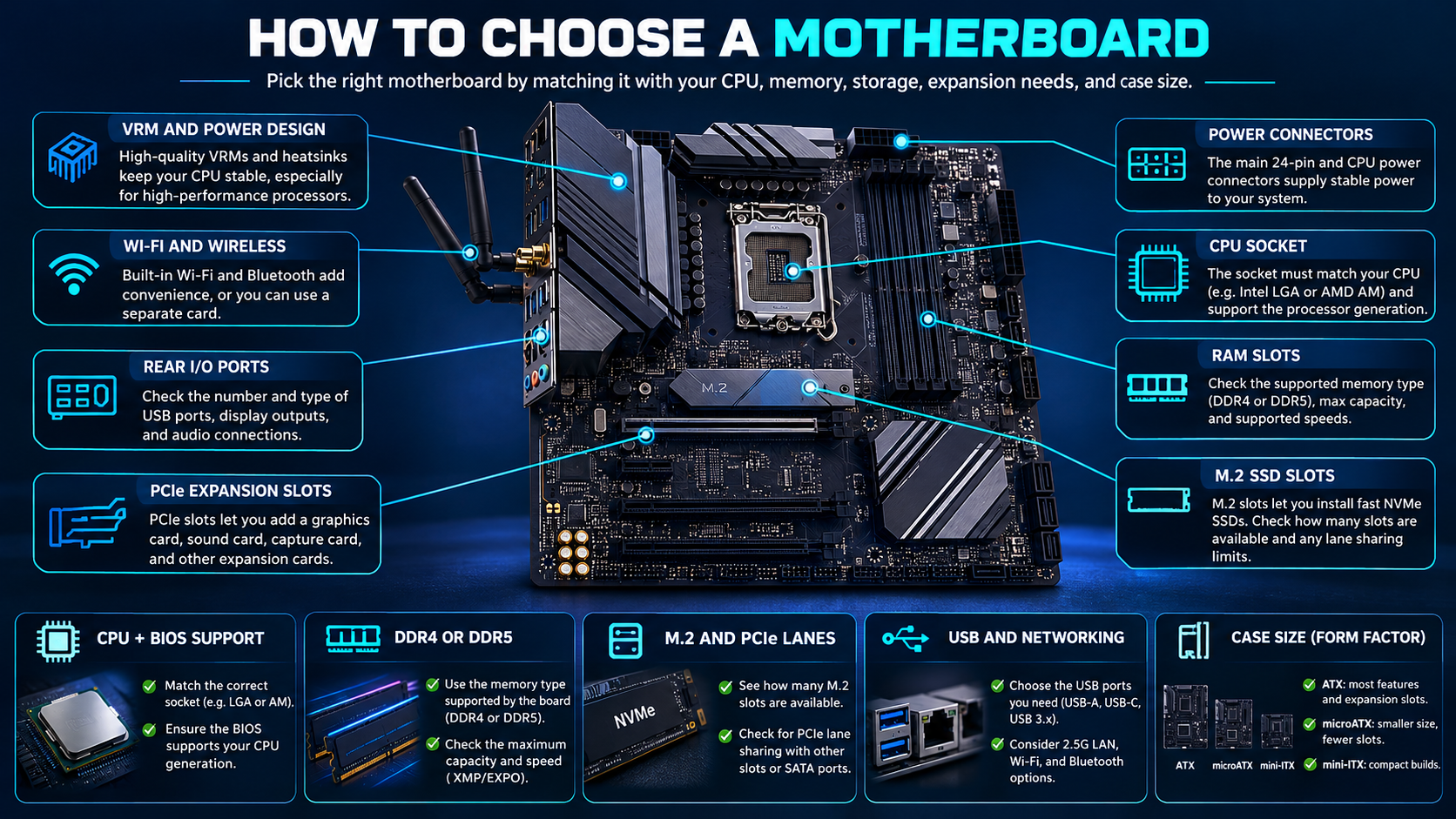
Confirm the exact processor appears on the motherboard manufacturer’s CPU support list. A matching socket is necessary but not sufficient: chipset generation, firmware version and board revision can affect support. Check whether a BIOS update is required and whether the board offers a supported BIOS-flash method if the installed CPU cannot boot with the current firmware.
2. Check memory generation, capacity and slots
Motherboards support specific memory generations; DDR4 and DDR5 are not interchangeable. Confirm the maximum supported capacity, number of DIMM slots, recommended memory configurations and the manufacturer’s supported speeds for your processor. Advertised overclocked memory speeds may depend on the CPU, module count, rank and BIOS settings.
3. Understand VRM and power delivery
The voltage-regulator module (VRM) supplies and regulates power for the CPU. For a mainstream processor at stock settings, an extreme VRM configuration may not provide useful value. For a high-power CPU, sustained workloads or tuning, look for credible reviews that evaluate temperatures and power behaviour on the exact board. Do not judge VRM quality from phase-count marketing alone.
4. Count M.2 slots, PCIe slots and shared lanes
Check how many M.2 sockets the board has, which PCIe generations and lane widths they support, and whether installing an SSD disables or reduces the bandwidth of another slot or port. Read the manual’s storage and expansion notes. A board can physically provide multiple sockets while routing them through different sources or sharing bandwidth.
Also consider the graphics-card slot, add-in cards, capture cards and future storage. The slot’s physical length and its electrical lane configuration are different things; verify the exact specifications rather than assuming every x16-length slot runs at x16 electrically.
5. Compare USB, networking and audio
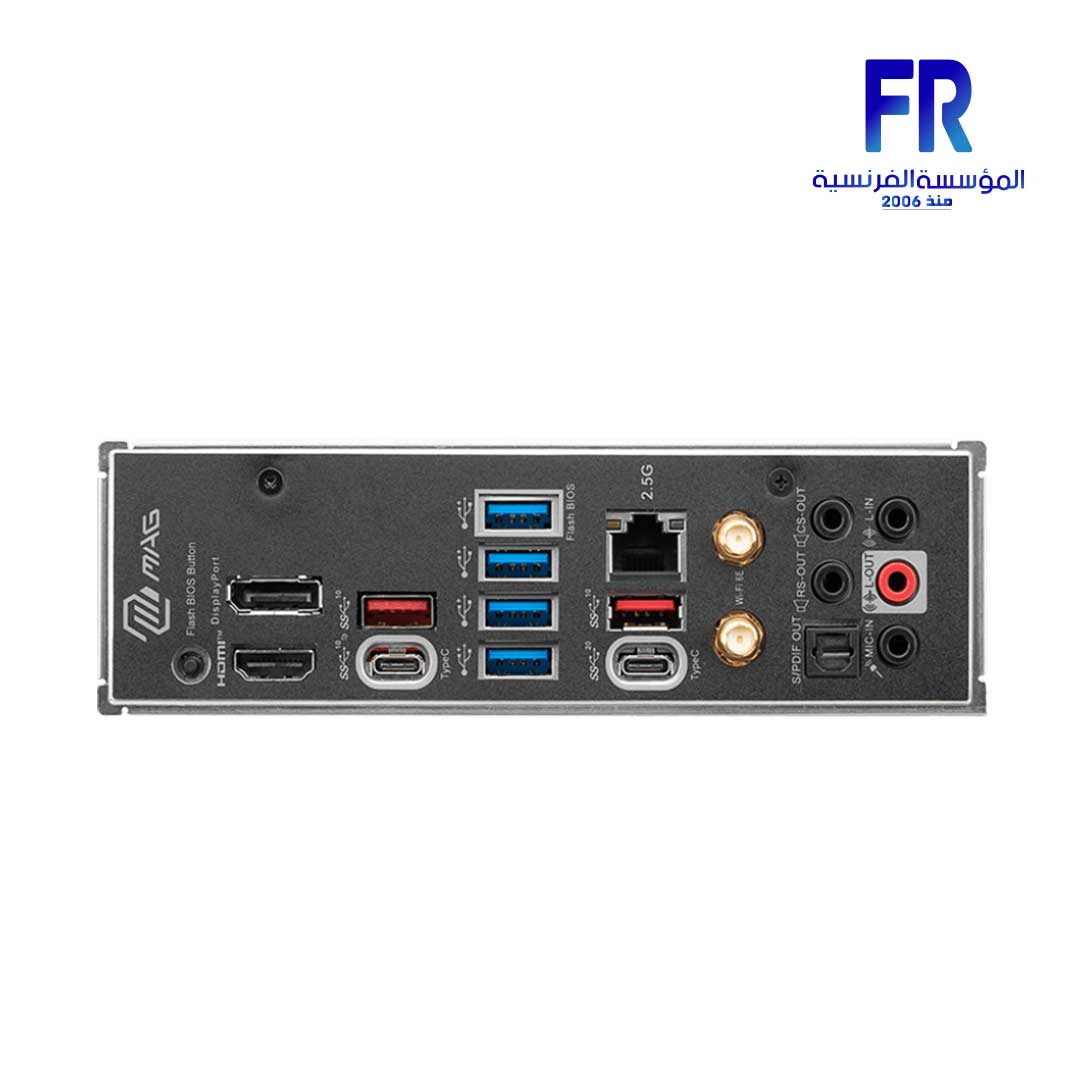
List the ports and network features you actually need: front USB-C, rear USB-C, USB transfer speeds, wired Ethernet speed, Wi-Fi generation, Bluetooth, audio outputs and any specialised connections. If you use a case with front USB-C, make sure the motherboard has the matching internal header. Built-in Wi-Fi and Bluetooth features vary by exact board model and regional version.
6. Check board size and practical extras
Confirm the board form factor fits your case and leaves room for the planned cooler, graphics card and drives. Useful extras may include BIOS flashback, debug LEDs, fan headers, reinforced slots, heatsinks, and convenient M.2 installation. Prioritise features that solve a real need instead of paying for specifications you will not use.
Motherboard buying checklist
| Item | What to verify |
|---|---|
| CPU | Exact model, support list and minimum BIOS version |
| RAM | DDR generation, capacity, DIMM count and supported configuration |
| Storage | M.2 count, PCIe generation and lane-sharing notes |
| Expansion | GPU slot, add-in card needs and electrical lane configuration |
| Connectivity | USB headers, LAN, Wi-Fi, Bluetooth and audio |
| Physical fit | Board form factor, cooler access and case clearance |
For a real example, MSI’s official MAG X670E TOMAHAWK WIFI specification page lists CPU support, DDR5 memory, M.2 slots and shared-lane notes. Compare those details with the exact parts in your own build. The board is an example, not a universal recommendation.
You can also review the MSI MAG X670E TOMAHAWK WIFI product listing and verify the current product details before ordering.
Frequently asked questions
Is a motherboard compatible if the socket matches?
Not necessarily. Check the CPU support list, BIOS requirements, chipset and board revision.
Do I need an expensive motherboard for gaming?
Usually not by default. Choose a board with adequate CPU support, power delivery, storage and connectivity for your parts and upgrade plans.
Can I mix DDR4 and DDR5 on one motherboard?
No. A motherboard is designed for one memory generation. Choose RAM that matches the exact board.
Sources
Next step: Make a shortlist only after confirming your CPU, memory generation, case size and required connections.
Compare options before you buy
Check the exact model, compatibility, current availability and warranty terms.
alfrensia.com — Alfrensia, French Establishment for Computers
إزاي تختار Motherboard مناسبة؟
اللوحة الأم لازم تكون متوافقة مع المعالج والرام والكيسة وأجهزة التخزين والتوصيلات اللي محتاجها. ما تختارش بناءً على شكل اللوحة أو عدد المنافذ فقط؛ راجع موديل اللوحة الكامل ودليل الشركة.
أهم نقاط التوافق
- CPU socket: لازم السوكت يدعم المعالج، مع مراجعة قائمة المعالجات المدعومة وإصدار BIOS المطلوب.
- Chipset: بيحدد مجموعة من خصائص الاتصال والتوسعة، لكن الخصائص الفعلية تختلف حسب موديل اللوحة.
- RAM: راجع DDR generation والسعة القصوى والترددات المدعومة وعدد الشقوق.
- VRM and cooling: مهمين لاستقرار الطاقة، خصوصاً مع المعالجات الأعلى استهلاكاً؛ راجع اختبارات ومراجعات الموديل.
- M.2 and PCIe: افحص عدد المنافذ والجيل المدعوم وقواعد مشاركة المسارات.
- Form factor: اتأكد إن ATX أو micro-ATX أو mini-ITX يناسب الكيسة.
الميزات اللي ممكن تحتاجها
حدد احتياجك لـWi-Fi وBluetooth وEthernet وUSB وUSB-C ومخارج الصوت وعدد منافذ المراوح. مش كل لوحة فيها كل الميزات حتى لو من نفس الفئة.
الأسئلة الشائعة
هل كل معالج بنفس السوكت متوافق؟
مش بالضرورة؛ راجع قائمة الدعم وإصدار BIOS وحدود الطاقة الخاصة باللوحة.
هل لوحة أغلى معناها أداء ألعاب أعلى؟
مش تلقائياً. لو اللوحتان توفران التوافق والميزات المطلوبة، الأداء بيتحدد أساساً بباقي الجهاز وحدود التشغيل.
هل أقدر أركب DDR5 في لوحة DDR4؟
لأ؛ نوع الذاكرة لازم يطابق ما تدعمه اللوحة، والشقوق مختلفة مادياً.
راجع الدليل قبل الطلب
مصادر رسمية للتحقق من التوافق
- Intel Support لمعلومات دعم المعالجات والمنصات.
- AMD Support لمواصفات المعالجات ودعمها.
- MSI Support كمثال على أدلة اللوحات وتحديثات BIOS حسب الموديل.
قارن الموديل الدقيق ودعم المعالج والرام والمنافذ والضمان والسعر الحالي. راجع موقع المؤسسة الفرنسية للكمبيوتر، أو تواصل مع المبيعات على واتساب للاستفسار عن التوافق والتوفر.