




Thermal Grizzly 1x12VHPWR to 3x8Pin PCIe Reversed GPU WireView
1 EGP
- Color : Black
- Connector Type : 1x 12VHPWR, 3x 8-Pin, 4-Pin
- Display : OLED
- Material : Aluminum
Thermal Grizzly 1x12VHPWR to 3x8Pin PCIe Reversed GPU WireView
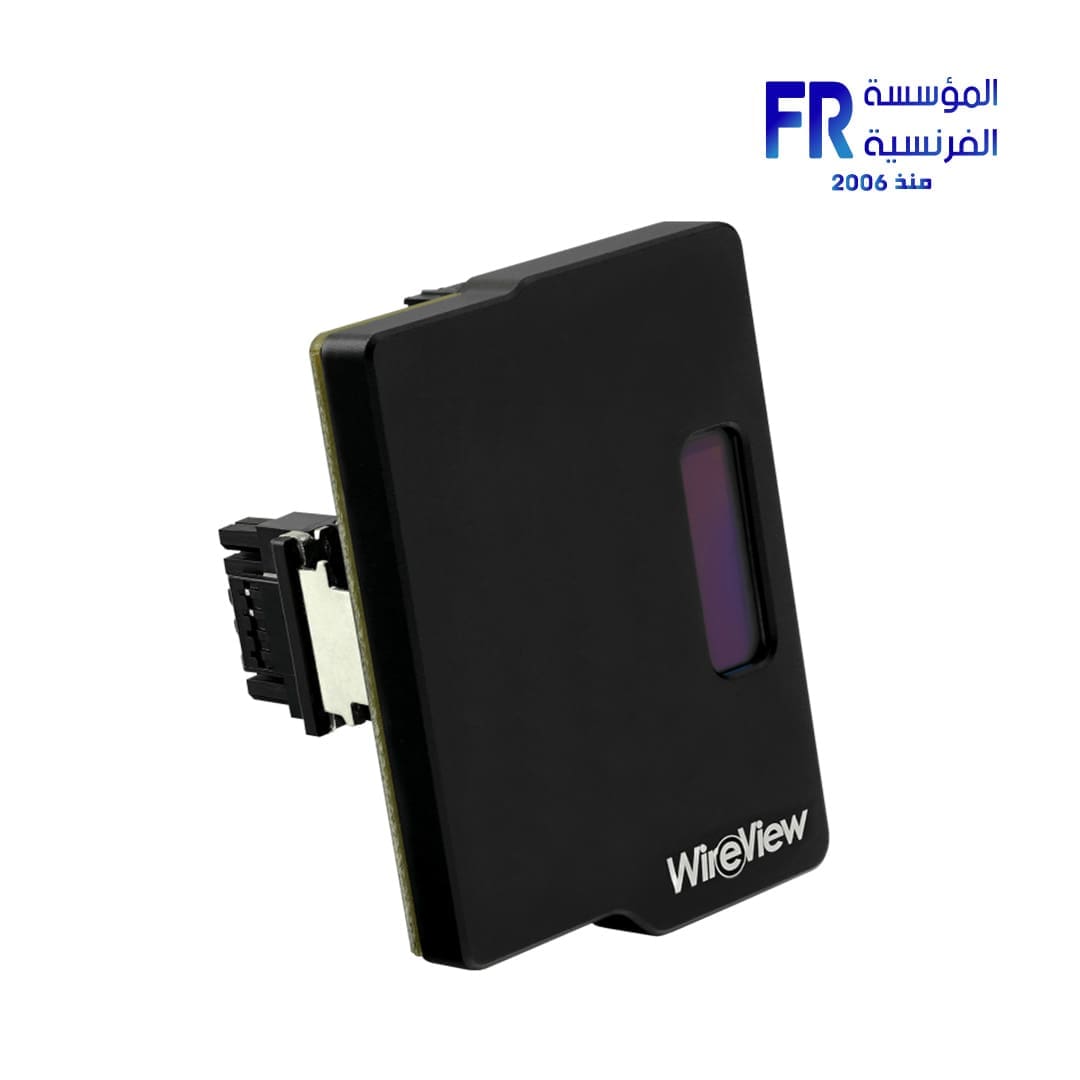
Thermal Grizzly 1x12VHPWR to 3x8Pin PCIe Reversed GPU WireView SPECIFICATIONS:
- Color : Black
- Connector Type : 1x 12VHPWR, 3x 8-Pin, 4-Pin
- Display : OLED
- Material : Aluminum
The WireView GPU is a device for measuring the power consumption of graphics cards that was developed in collaboration with Jon “elmor” Sandström It is plugged into the PCIe power connectors of the graphics card and connected to the power supply unit via the PCIe power cables. The power consumption data is displayed via an OLED display.
At the same time, the WireView GPU takes on a cable management function, as its “U”shape enables optimised routing of the cables. The PCIe power cables are connected to the WireView GPU in such a way that they can be laid neatly over the backplate of the graphics card. This avoids cable bulges when routing the power cables and simplifies cable management.
- Measuring power consumption
- Logging of power consumption
- Optimised cable routing
- Easy mounting
- High compatibility
The WireView GPU enables the measurement of the power consumption of graphics cards and records this data to determine the power consumption. This data can be used, among other things, to determine the power costs of a graphics card or to compare the power consumption with other graphics cards. A special 60-second measuring cycle enables the power consumption to be displayed quickly and conveniently, which is very practical for reviews, for example.
At the same time, measuring the power consumption can be used to determine the power consumption of graphics cards over a certain period of time or with certain applications. In addition, load peaks in power consumption (“peaks”) that can occur in the operation of current high-end graphics cards can be determined.
The WireView GPU shows the measured values on the display. You can switch between the displayed values at the touch of a button. The following values can be displayed:
- Display of the current Power Consumption in watts [W]
- Current Power Consumption in watts [W], current Voltage in volts [V], current Current in amperes [A]
- Minimum and maximum Power Consumption in watts [W]
- Average Power Consumption over 60 seconds [AVG W] and total Power Consumption [E]
The WireView GPU is available in “N” and “R” versions regardless of the number of 8-pin PCIe connectors (or the 12VHPWR plug). “N” stands for the normal orientation of the PCIe connectors on the PCIe expansion card, while “R” stands for the rotated (reversed) orientation. In the normal orientation (N), the retaining clip of the connector points away from the PCB of the expansion card. In the rotated orientation (R), the connector’s retaining clip points towards the PCB.
The WireView GPU is also available in two “high power” variants for the 12VHPWR connector. The first variant has one 12VHPWR input and output each, while the second variant is connected to the graphics card via 12VHPWR and to the power supply via three 8-pin PCIe connectors.
When using the 12VHPWR adapter, make sure that each of the three 8-pin PCIe connectors is connected to the power supply unit with a separate 8-pin PCIe cable. The use of a splitter (Y-cable) is strongly discouraged! The configuration of the 12VHPWR corresponds to the 600W version.
Attention, important note: Risk of injury!
Depending on the graphics card used, but especially in the case of the GeForce RTX 4090, up to 450 watts of current flow through the connections of the WireView. The waste heat generated by this can heat the circuit board at the connector of the WireView up to 60 degrees Celsius with an air-cooled graphics card. In the case of a water-cooled graphics card without airflow, the PCB of the WireView can heat up to 100 degrees Celsius! The WireView housing should not be touched during continuous operation under full load. After switching off the system, the WireView should be allowed to cool down before handling it. You can find more information in the Hardware Unboxed video.
Only logged in customers who have purchased this product may leave a review.
Related products











Reviews
There are no reviews yet.