




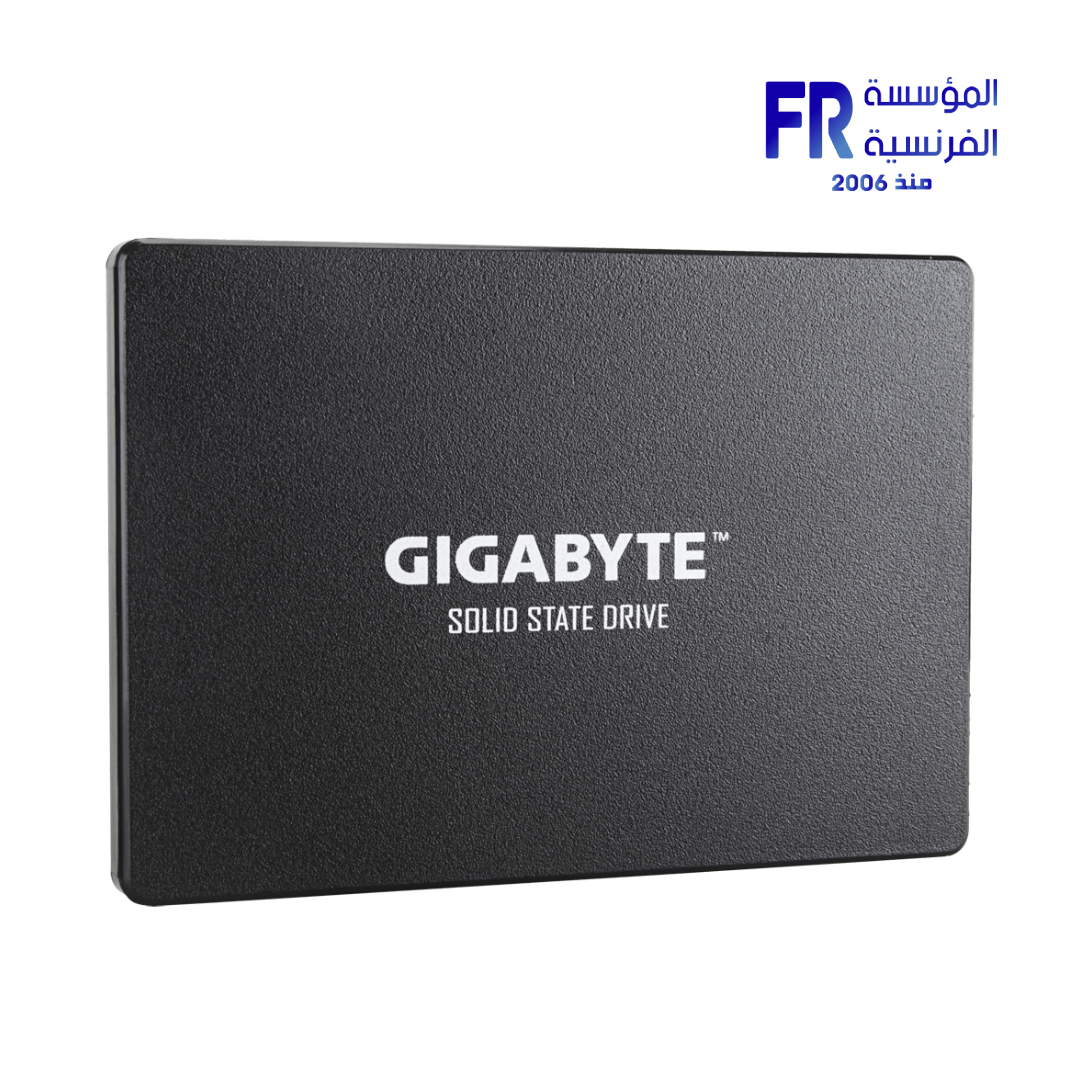

Gigabyte 256Gb Internal Solid State Drive SSD
575 EGP
- 2.5-inch SATA SSDs: These are the most common type, fitting into the same bays as traditional 2.5-inch HDDs and connecting via a SATA 3.0 interface. They offer sequential read/write speeds typically up to 550 MB/s and 500 MB/s, respectively. They’re an excellent and cost-effective upgrade for older laptops and desktops.
- M.2 NVMe PCIe Gen3 SSDs: These compact drives plug directly into an M.2 slot on your motherboard and utilize the PCIe Gen3 x4 interface. This allows for much faster speeds, often reaching sequential reads up to 2500 MB/s and writes up to 1500 MB/s, providing a noticeable performance jump over SATA SSDs.
- M.2 NVMe PCIe Gen4 SSDs: The latest generation offers even more blistering speeds, with sequential reads potentially exceeding 5000 MB/s and writes around 2500 MB/s for 256GB models. These require a compatible PCIe Gen4 motherboard and CPU to achieve their full potential, making them a high-end option for the latest systems.
Gigabyte 256GB Internal Solid State Drive (SSD) Overview:
A Gigabyte 256GB internal SSD is a fast and efficient storage solution designed to significantly boost your computer’s performance. Unlike traditional hard disk drives (HDDs), SSDs use flash memory, which means no moving parts, leading to faster data access, greater durability, and silent operation. A 256GB capacity is ideal for an operating system drive, providing quick boot times and rapid loading for essential applications.
Common Types and Their Characteristics:
Gigabyte offers 256GB SSDs in a few common form factors, each with distinct performance characteristics:
- 2.5-inch SATA SSDs: These are the most common type, fitting into the same bays as traditional 2.5-inch HDDs and connecting via a SATA 3.0 interface. They offer sequential read/write speeds typically up to 550 MB/s and 500 MB/s, respectively. They’re an excellent and cost-effective upgrade for older laptops and desktops.
- M.2 NVMe PCIe Gen3 SSDs: These compact drives plug directly into an M.2 slot on your motherboard and utilize the PCIe Gen3 x4 interface. This allows for much faster speeds, often reaching sequential reads up to 2500 MB/s and writes up to 1500 MB/s, providing a noticeable performance jump over SATA SSDs.
- M.2 NVMe PCIe Gen4 SSDs: The latest generation offers even more blistering speeds, with sequential reads potentially exceeding 5000 MB/s and writes around 2500 MB/s for 256GB models. These require a compatible PCIe Gen4 motherboard and CPU to achieve their full potential, making them a high-end option for the latest systems.
Key Features (General to Gigabyte SSDs):
- High-Quality NAND Flash: Gigabyte SSDs typically use high-quality 3D TLC NAND Flash memory, offering a balance of performance, endurance, and cost.
- SLC Cache Technology: Most Gigabyte SSDs implement an SLC (Single-Level Cell) cache, which uses a small portion of the NAND Flash to operate in a faster SLC mode. This significantly boosts burst read/write performance, making everyday tasks feel incredibly responsive.
- Wear-Leveling Technology: To extend the lifespan of the SSD, wear-leveling algorithms distribute data writes evenly across all NAND cells, preventing premature wear of specific areas.
- TRIM Support: This command helps maintain the performance of the SSD over time by allowing the operating system to inform the SSD which data blocks are no longer in use and can be wiped.
- SSD Tool Box Software: Gigabyte provides its “SSD Tool Box” software, which allows users to monitor the SSD’s health, temperature, and performance, and perform various optimizations.
- Reliability: Built with a focus on durability, Gigabyte SSDs are designed to withstand shock and vibration much better than traditional hard drives.
Benefits of a 256GB SSD:
- Blazing Fast Boot Times: Your operating system will load in seconds, not minutes.
- Quicker Application Loading: Programs and games installed on the SSD will launch significantly faster.
- Improved Overall System Responsiveness: Multitasking and general system operations feel much smoother.
- Silent Operation: With no moving parts, SSDs produce no noise, contributing to a quieter computing experience.
- Enhanced Durability: Less susceptible to damage from drops or impacts compared to HDDs.
A 256GB SSD is often used as a primary drive for the operating system and essential applications, while a larger, more affordable HDD might be used for mass storage of games, videos, and other large files.
| MODEL | |
|---|---|
| Capacity | |
| STORAGE TYPE | |
| Memory Component | |
| Transfer Rate | |
| WRITE | |
| DRAM CACHE | |
| Part Number | |
| Warranty |
Only logged in customers who have purchased this product may leave a review.
Related products




Reviews
There are no reviews yet.